[Parameter]
Settings related to 3D display of robot parameters.
You can set the coordinate system and displayed name for each parameter.
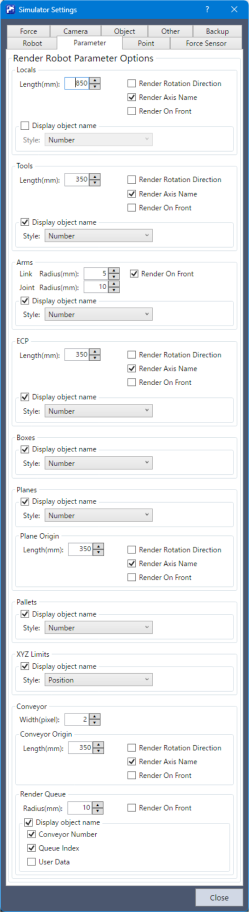
Render Robot Parameter Options
| Item | Description |
|---|---|
| Length | Set a length of the coordinate axis. |
| Render Rotation Direction | Display the rotational direction of the coordinate axis. |
| Render Axis Name | Displays the coordinate axis names (X, Y, Z, U, V, W). |
| Render On Front | Display the arrow of "Render Robot Parameter" in front of the robot or the object. |
| Show object names | Displays the object name (parameter name) of the robot parameters. This setting is available only with Epson RC+ Standard Edition and Premium Edition. The label display is not available in the Basic Edition. |
| Style | You can set the display style when the object name (parameter name) of the robot parameters is displayed.
|
| Link radius | You can set the radius of the cylinder that shows each link (arm) when displaying an additional arm. |
| Joint radius | You can set the radius of the sphere that shows each joint in the display of the additional arm. |
| Width | You can set the conveyor tracking upstream and downstream limits, and the width of the tracking abort line. This setting is available only with Epson RC+ Standard Edition and Premium Edition. |
| Show Queue | You can configure the display of queue information for conveyor tracking. This setting is available only with Epson RC+ Standard Edition and Premium Edition. The queue information can be displayed as a sphere. The radius allows you to set the size of the sphere. In addition, by enabling the object name display, you can also display the conveyor number, queue index, and user data. |