Virtual Direct Teaching
Virtual direct teaching is a function to perform a jog operation by dragging the robot. The operation simulates direct teaching.
How to use virtual direct teaching
Click the
 [Direct Teach] button on the Epson RC+ 8.0 toolbar. When you mouse over the robot, the selected joint will appear in yellow.
Click the robot. The mouse cursor matches TCP.
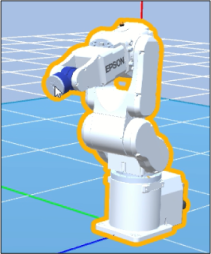
Operate the robot by dragging.
The robot operates so that the mouse cursor matches TCP. The robot operates with the arm orientation reflects the robot operation panel.
Virtual direct teaching restriction
- When the mouse cursor is outside the robot operating range: Mouse cursor does not match TCP. The robot will be elbow singularity.
TIP
You can also rotate objects when the [Direct Teach] button is clicked. See details below.
3D Display - "Rotate the robot / layout object"