Restoring Simulator Data
In Epson RC+ Standard Edition and Premium Edition, you can restore the simulator data by selecting [Tools] menu - [Controller] - [Restore Controller].
If simulator data exists in the backup data, you can select the simulator data as an item to restore.
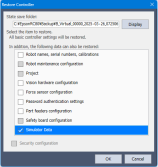
The following message appears if the restore is completed successfully.
If the simulator data contains a CAD file, the message indicates the location where the CAD file will be extracted.
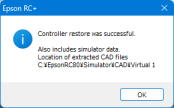
Restoring CAD files
The CAD file will be extracted to the [Connection Name] folder in the C:\EpsonRC80\Simulator\CAD folder. The layout information is updated according to the CAD files in this folder.
KEY POINTS
If a CAD file with the same name already exists at the extraction destination, that file is overwritten.