Backing up Simulator Data
The simulator data can be backed up as part of the backup data when you perform a controller settings backup using [Tools] menu - [Controller] - [Backup Controller].
The following simulator data is backed up.
- Layout information
- CAD files (if CAD/hand objects are present)
- Screenshot image of the overall layout
However, simulator data is not backed up if the simulator function is disabled on the controller.
Backing up CAD files
A message prompts whether to back up the CAD files.
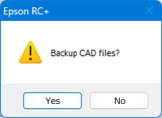
Click [Yes] to compile the CAD files used as CAD objects/hand objects into a single ZIP file and save it in the specified folder.
In Epson RC+ Standard Edition and Premium Edition, you can determine whether or not this confirmation message is displayed in the [Backup] tab of the [Simulator Settings] dialog box. If you choose not to display the message, the CAD files are backed up automatically.
KEY POINTS
When a robot is added or removed, the CAD files are not backed up when the controller settings are automatically backed up.