Command 2001: Moves in PTP motion with gate motion
Moves the arm in gate trajectory using PTP motion.
Command Syntax
- Option
Specify the target position specifying method and each option. The number of necessary parameters varies depending on the specified options. Speed/Accel setting and target position specifying method affect the number of parameters. Other options do not affect the number of parameters.
For Parameter 2 and later by options, follow the descriptions “2” and later.
Options are specified by Parameter 1.
| bit | Name | Description | |
|---|---|---|---|
| Parameter 1 | 15 | Till / Find / Sense | Specify Till, Find, and Sense options. 0 = not specify 1 = Till 2 = Find 3 = Sense |
| 14 | |||
| 13 | Parallel processing | Select whether to use a parallel processing 0 = No 1 = Yes | |
| 12 | CP | Select whether to use a path motion 0 = No 1 = Yes | |
| 11 | Speed / Accel | Specify whether to set Speed / Accel before executing the motion command. 0 = do not set 1 = set only Speed 2 = set only SpeedS 3 = set only SpeedR 4 = set only Accel 5 = set only AccelS 6 = set only AccelR 7 = set Speed and Accel 8 = set SpeedS and AccelS 9 = set SpeedR and AccelR | |
| 10 | |||
| 9 | |||
| 8 | |||
| 7 | reserved | Specify “0” | |
| 6 | Arch | When using Arch: Specify the arch number by an integer from 0 to 6 When not using Arch: Specify “7” | |
| 5 | |||
| 4 | |||
| 3 | reserved | Specify “0” | |
| 2 | Target position specifying method | Select the specifying method of the target position 0 Setting by point number 1 Setting by position in the pallet 2 Setting by coordinate in the pallet | |
| 1 | |||
| 0 |
- When selected “Setting by point number” for Target position specifying method and “do not set” in Speed / Accel.
In this case, use until Parameter 2.
Command No., Parameter 1, Parameter 2
| bit | Name | Description | |
|---|---|---|---|
| Parameter 2 | 15 | pointNumber | Specifies the target position by a point number |
| 14 | |||
| | | |||
| 1 | |||
| 0 |
- When selected “Setting by position in the pallet” for Target position specifying method and “do not set” in Speed / Accel.
In this case, use until Parameter 3.
Command No., Parameter 1, Parameter 2, Parameter 3
| bit | Name | Description | |
|---|---|---|---|
| Parameter 2 | 15 | palletNumber | Specifies the pallet number to be used |
| 14 | |||
| | | |||
| 1 | |||
| 0 |
| bit | Name | Description | |
|---|---|---|---|
| Parameter 3 | 15 | position | Specifies the pallet position |
| 14 | |||
| | | |||
| 1 | |||
| 0 |
- When selected “Setting by coordinate in the pallet” for Target position specifying method and “do not set” in Speed / Accel.
In this case, use until Parameter 4.
Command No., Parameter 1, Parameter 2, Parameter 3, Parameter 4
| bit | Name | Description | |
|---|---|---|---|
| Parameter 2 | 15 | palletNumber | Specifies the pallet number to be used |
| 14 | |||
| | | |||
| 1 | |||
| 0 |
| bit | Name | Description | |
|---|---|---|---|
| Parameter 3 | 15 | row | Specifies the row in the pallet |
| 14 | |||
| | | |||
| 1 | |||
| 0 |
| bit | Name | Description | |
|---|---|---|---|
| Parameter 4 | 15 | line | Specifies the line in the pallet |
| 14 | |||
| | | |||
| 1 | |||
| 0 |
- When selected “Setting by point number” for Target position specifying method and “set Speed and Accel” in Speed / Accel.
In this case, use until Parameter 3.
Command No., Parameter 1, Parameter 2, Parameter 3
| bit | Name | Description | |
|---|---|---|---|
| Parameter 2 | 15 | pointNumber | Specifies the target position by a point number |
| 14 | |||
| | | |||
| 1 | |||
| 0 |
| bit | Name | Description | |
|---|---|---|---|
| Parameter 3 | 15 | Speed / SpeedS / SpeedR | Specifies the speed table number of the selected type by an integer from 0 to 15. * Specify “0” if acceleration and deceleration are not set. |
| | | |||
| 8 | |||
| 7 | Accel / AccelS / AccelR | Specifies the acceleration/deceleration table number of the selected type by an integer from 0 to 15. *Specify “0” if acceleration and deceleration are not set. | |
| | | |||
| 0 |
- When selected “Setting by position in the pallet” for Target position specifying method and “set Speed and Accel” in Speed / Accel.
In this case, use until Parameter 4.
Command No., Parameter 1, Parameter 2, Parameter 3, Parameter 4
| bit | Name | Description | |
|---|---|---|---|
| Parameter 2 | 15 | palletNumber | Specifies the pallet number to be used |
| 14 | |||
| | | |||
| 1 | |||
| 0 |
| bit | Name | Description | |
|---|---|---|---|
| Parameter 3 | 15 | position | Specifies the pallet position |
| 14 | |||
| | | |||
| 1 | |||
| 0 |
| bit | Name | Description | |
|---|---|---|---|
| Parameter 4 | 15 | Speed / SpeedS / SpeedR | Specifies the speed table number of the selected type by an integer from 0 to 15. *Specify “0” if acceleration and deceleration are not set. |
| | | |||
| 8 | |||
| 7 | Accel / AccelS / AccelR | Specifies the acceleration/deceleration table number of the selected type by an integer from 0 to 15. *Specify “0” if acceleration and deceleration are not set. | |
| | | |||
| 0 |
- When selected “Setting by coordinate in the pallet” for Target position specifying method and “set Speed and Accel” in Speed / Accel.
In this case, use until Parameter 5.
Command No., Parameter 1, Parameter 2, Parameter 3, Parameter 4, Parameter 5
| bit | Name | Description | |
|---|---|---|---|
| Parameter 2 | 15 | palletNumber | Specifies the pallet number to be used |
| 14 | |||
| | | |||
| 1 | |||
| 0 |
| bit | Name | Description | |
|---|---|---|---|
| Parameter 3 | 15 | row | Specifies the row in the pallet |
| 14 | |||
| | | |||
| 1 | |||
| 0 |
| bit | Name | Description | |
|---|---|---|---|
| Parameter 4 | 15 | line | Specifies the line in the pallet |
| 14 | |||
| | | |||
| 1 | |||
| 0 |
| bit | Name | Description | |
|---|---|---|---|
| Parameter 5 | 15 | Speed / SpeedS / SpeedR | Specifies the speed table number of the selected type by an integer from 0 to 15. *Specify “0” if acceleration and deceleration are not set. |
| | | |||
| 8 | |||
| 7 | Accel / AccelS / AccelR | Specifies the acceleration/deceleration table number of the selected type by an integer from 0 to 15. *Specify “0” if acceleration and deceleration are not set. | |
| | | |||
| 0 |
Response Syntax
Refer to the following.
Description
This command moves the arm from the current position to the specified position with a gate motion (a motion which the arm lifts first, and then moves horizontally and lowers vertically at the end).
Jump command moves the arm from the current position to the target position in “Arch motion”. This command can be considered as a statement which executes three movements at one time. For example, if the arch number is defined, one issue of Jump command executes following three commands.
- First, only the Joint #3 lifts up to the Z axis height calculated by the Arch number used for the Jump command .
- Then, while still moving upward in Z-axis direction, the arm moves horizontally towards the target position until it reaches the upper Z Limit defined by LimZ. Then the arm starts lowering in Z-axis direction while continuing each motion of Joint #1, #2 and #4. The arm moves until final X, Y and U axis coordinates are acquires.
- Jump command is then completed by moving the arm down with only Z-axis motion until the target Z coordinate position is reached.
The coordinates of destination (the target position for the move) must be taught previously before executing the Jump command. Acceleration and deceleration for the Jump is controlled by the Accel command. Speed for the move is controlled by the Speed command.
Jump command cannot be used for horizontal 6-axis manipulators. For those manipulators, use Jump3.
About CP Parameter
When CP parameter is added, acceleration of subsequent command can be overwrapped to deceleration of the prior command. In this case, the arm is not positioned at the target point.archNumber Details
The arch shape of Jump command can be modified by the archNumber value optionally specified in Jump command. This allows the user to define how much the manipulator moves in Z-axis direction before the Joint #1, #2, and #4 move. Valid archNumber entries for Jump command are from 0 to 7. The Arch table entries from 0 to 6 are user definable with the Arch command. However, the arch table entry 7 always defines a Gate Motion. Gate Motion is a motion which the manipulator moves only the Joint #3 to the Z-axis coordinate defined by LimZ command before moving Joint #1, #2, and #4. In Gate Motion, Joint #1, #2 and #4 motion begin when the manipulator reaches Z limit defined by LimZ. After the Joint #1, #2, and #4 reach each final destination position, Joint #3 begins moving downward to the final Z-axis coordinate position as defined by destination (the target point). Gate Motion looks as follows:
Symbol Description a Origin Pt. b Destination Pt. LimZ Details
LimZ zLimit specifies the upper Z coordinate value for the horizontal moving plane of the current local coordinate system. The specified arch settings can cause the Joint #1, #2, and #4 to begin movement before reaching LimZ, but LimZ is always the maximum Z height for the move.
The limit value in height direction specified by LimZ is the Z-axis coordinate of local robot coordinate system. It is not the Z-axis coordinate for Arm or Tool coordinates. Therefore, pay enough attention and take necessary measures to use the tools or hands with different work heights.Sense Details
The Sense optional parameter allows the user to check for an input condition or memory I/O condition before beginning the final Z motion downward. If satisfied, this command completes with the manipulator stopped above the target position where only Z motion is required to reach the target position. It is important to note that the manipulator arm does not stop immediately upon sensing the Sense input modifier.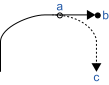
Symbol Description a Check for a condition b Command complete c Destination Pt.
Command No. 952 can then be used to verify whether the Sense condition was satisfied and the manipulator stopped prior to its target position or that the Sense condition was not satisfied and the manipulator continued until stopping at its target position.
- Till Details
The optional Till qualifier allows the user to specify a condition to cause the manipulator to decelerate to stop prior to completing Jump. The user can check if the input is On or Off and cause the arm to decelerate and stop based on the condition specified.
CAUTION
Jump cannot be executed for 6-axis manipulators.
Use Jump3 or Jump3CP for 6-axis manipulators.
Omitting archNumber Parameter
If the archNumber optional parameter is set to “7”, manipulator motion will be Gate Motion, as described above.Difference between Jump and Jump3, Jump3CP
Jump3 and Jump3CP commands can be used for 6-axis manipulators, while Jump command cannot. For SCARA manipulators (including RS series), using Jump command shortens the joint motion time for depart and approach motion. Depart and approach motion in Jump3 can be executed along the Z axis and in other directions.Difference between Go and Jump
The most important difference is that Go command simply causes Point to Point motion where all joints start and stop at the same time (they are synchronized). Jump is different since it causes vertical Z movement at the beginning and end of the move. Jump is ideal for pick and place type applications.Decelerating to stop with Jump command
Jump command always causes the arm to decelerate to stop prior to reaching the destination point.Proper Speed and Acceleration instructions with Jump:
Speed and Accel commands are used to specify the speed and acceleration of the manipulator during Jump motion. Note that Speed and Accel apply to point to point type motion (Go, Jump, etc.). For linear and circular interpolated motion commands such as Move or Arc, use SpeedS and AccelS commands. For Jump command, it is possible to separately specify speeds and accelerations for upward motion of Joint #3, horizontal travel including Joint #4 rotation, and Joint #3 downward motion.Pass function of Jump
When the CP parameter is specified for Jump with 0 downward motion, the Jump horizontal travel does not decelerate to a stop but goes on smoothly to the next PTP motion.
When the CP parameter is specified for a PTP motion command right before a Jump with 0 upward motion, the PTP motion does not decelerate to a stop but connects smoothly with the Jump horizontal travel.
This is useful when you want to replace the horizontal travel of Jump (a PTP motion) with several PTP motion.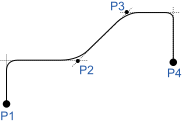
Important concerns for use of Arch
Actual arch motion trajectory cannot be guaranteed since the arch motion is comprised of vertical motion and horizontal motion executed on trajectory control. The trajectory may change depending on motion speed or Arm motion. Check the actual trajectory with actual speed and posture used in operation.- Even if Jump command with the same arch number is executed at the same position, trajectory in low speed mode goes lower than that of in high speed mode. Therefore, even if collision with obstacle is not seen in high speed mode, the manipulator may hit with obstacle in low speed mode.
- Amount of vertical lift tends to increase and vertical-drop tends to decrease in high speed mode compared to low speed mode. When the fall distance of the trajectory is shorter than expected, lower the speed and/or the deceleration, or set the fall distance larger.
- Even if Jump command with the same distance and speed is executed, the trajectory is affected by motion of the robot arms. As a general example, the vertical upward distance increases and the vertical downward distance decreases for a SCARA robot when the movement of the first arm is large. When the vertical fall distance decreases and the trajectory is shorter than expected, lower the speed and/or the deceleration, or set the fall distance larger.
Potential Errors
LimZ Value Not High Enough
When the current arm position of the Z joint is higher than the value set for LimZ and a Jump instruction is attempted, an Error 4005 will occur .
Example
When specifying P1 by point number determination without an option.
| Command | Response |
| 07D1H 0070H 0001H | 07D1H 0000H 0000H |
When specifying Pallet 15 by pallet position determination, with position =10, without an option.
| Command | Response |
| 07D1H 0071H 000FH 000AH | 07D1H 0000H 0000H |
When specifying Pallet 15 with row = 1 Line = 3 by pallet coordinate determination without an option.
| Command | Response |
| 07D1H 0072H 000FH 0001H 0003H | 07D1H 0000H 0000H |
When specifying P1 by point number determination, with Speed/Accel= set Speed only, Table number = 8.
| Command | Response |
| 07D1H 0170H 0001H 0800H | 07D1H 0000H 0000H |