Command 2002: Moves the arm with 3D gate motion
Moves the manipulator in 3D gate trajectory, using a combination of two CP motions and one PTP motion.
Command Syntax
- Option
Specify the target position specifying method and each option. The number of necessary parameters varies depending on the specified options. Speed / Accel setting affects the number of parameters.
Other options do not affect the number of parameters.
For Parameter 2 and later by options, follow the descriptions “2” and later.
Options are specified by Parameter 1.
| bit | Name | Description | |
|---|---|---|---|
| Parameter 1 | 15 | Till / Find / Sense | Specify Till, Find, and Sense options. 0 = not specify 1 = Till 2 = Find 3 = Sense |
| 14 | |||
| 13 | Parallel processing | Select whether to use a parallel processing 0 = No 1 = Yes | |
| 12 | CP | Select whether to use a path motion 0 = No 1 = Yes | |
| 11 | Speed / Accel | Specify whether to set Speed / Accel before executing the motion command. 0 = do not set 1 = set only Speed 2 = set only SpeedS 3 = set only SpeedR 4 = set only Accel 5 = set only AccelS 6 = set only AccelR 7 = set Speed and Accel 8 = set SpeedS and AccelS 9 = set SpeedR and AccelR | |
| 10 | |||
| 9 | |||
| 8 | |||
| 7 | reserved | Specify “0” | |
| 6 | Arch | When using Arch: Specify the arch number by an integer from 0 to 6 When not using Arch: Specify “7” | |
| 5 | |||
| 4 | |||
| 3 | reserved | Specify “0” |
- No Speed / Accel setting
In this case, use until Parameter 4.
Command No., Parameter 1, Parameter 2, Parameter 3, Parameter 4
| bit | Name | Description | |
|---|---|---|---|
| Parameter 2 | 15 | pointNumber | Specifies the target position by a point number |
| 14 | |||
| | | |||
| 1 | |||
| 0 |
| bit | Name | Description | |
|---|---|---|---|
| Parameter 3 | 15 | approachStart | Specifies the approach start point over the target coordinate by a point number. |
| 14 | |||
| | | |||
| 1 | |||
| 0 |
| bit | Name | Description | |
|---|---|---|---|
| Parameter 4 | 15 | destination | Specifies the target coordinate where the manipulator reaches to by a point number. |
| 14 | |||
| | | |||
| 1 | |||
| 0 |
- With Speed / Accel setting
In this case, use until Parameter 5.
Command No., Parameter 1, Parameter 2, Parameter 3, Parameter 4, Parameter 5
| bit | Name | Description | |
|---|---|---|---|
| Parameter 2 | 15 | depart | Specifies the depart point over the target coordinate by a point number. |
| 14 | |||
| | | |||
| 1 | |||
| 0 |
| bit | Name | Description | |
|---|---|---|---|
| Parameter 3 | 15 | approachStart | Specifies the approach start point over the target coordinate by a point number. |
| 14 | |||
| | | |||
| 1 | |||
| 0 |
| bit | Name | Description | |
|---|---|---|---|
| Parameter 4 | 15 | destination | Specifies the target coordinate where the manipulator reaches to by a point number. |
| 14 | |||
| | | |||
| 1 | |||
| 0 |
| bit | Name | Description | |
|---|---|---|---|
| Parameter 5 | 15 | Speed / SpeedS / SpeedR | Specifies the speed table number of the selected type by an integer from 0 to 15. *Specify “0” if speed is not set. |
| | | |||
| 8 | Accel / AccelS / AccelR | Specifies the acceleration/deceleration table number of the selected type by an integer from 0 to 15. *Specify “0” if speed is not set. | |
| 7 | |||
| | | |||
| 0 |
Response Syntax
Refer to the following.
Description
Moves the arm from the current position to the destination in 3D gate motion.
3D gate motion is a combination of two CP motion and one PTP motion.
Moves the arm from the current position to the destination point with 3D gate motion. 3D gate motion. Jump3 is a combination of two CP motion and one PTP motion. The depart motion form the current position to the depart point is always CP motion. The span motion from the depart point to the start approach point is PTP motion in Jump3, and the CP motion in Jump3CP. The approach motion from the starting approach point to the target point is always CP motion.
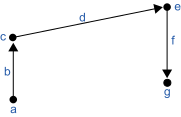
| Symbol | Description |
|---|---|
| a | Current position |
| b | Depart motion CP |
| c | Depart point |
| d | Span motion PTP/CP |
| e | Approach point |
| f | Approach motion CP |
| g | Destination point |
Arch motion is achieved by specifying the arch number.
The arch motion for Jump3, Jump3CP is as shown in the figure below.
For arch motion to occur, the Depart distance must be greater than the arch upward distance and the Approach distance must be greater than the arch downward distance.
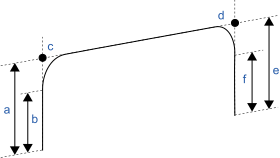
| Symbol | Description |
|---|---|
| a | Depart distance |
| b | ARCH Upward |
| c | Depart point |
| d | Start approach point |
| e | Approach distance |
| f | ARCH downward |
Jump3CP uses the SpeedS speed value and AccelS acceleration and deceleration values. Refer to Using Jump3CP with CP below on the relation between the speed/acceleration and the acceleration/deceleration. If, however, the ROT modifier parameter is used, Jump3CP uses the SpeedR speed value and AccelR acceleration and deceleration values. In this case SpeedS speed value and AccelS acceleration and deceleration value have no effect.
Usually, when the move distance is 0 and only the tool orientation is changed, an error will occur. However, by using the ROT parameter and giving priority to the acceleration and the deceleration of the tool rotation, it is possible to move without an error. When there is not an orientational change with the ROT modifier parameter and movement distance is not 0, an error will occur.
Also, when the tool rotation is large as compared to move distance, and when the rotation speed exceeds the specified speed of the manipulator, an error will occur. In this case, please reduce the speed or append the ROT modifier parameter to give priority to the rotational speed/acceleration/deceleration.
Notes
LimZ does not affect Jump3 and Jump3CP
LimZ has no effect on Jump3 or Jump3CP since the span motion is not necessarily perpendicular to the Z axis of the coordinate system.
Jump3 span motion is PTP (point to point)
It is difficult to predict Jump3 span motion trajectory. Therefore, be careful that the robot doesn't collide with peripheral equipment and that robot arms don’t collide with the robot.
Using Jump3, Jump3CP with CP
The CP parameter causes the arm to move to destination without decelerating or stopping at the point defined by destination. This is done to allow the user to string a series of motion instructions together to cause the arm to move along a continuous path while maintaining a specified speed throughout all the motion. The Jump3 and Jump3CP instructions without CP always cause the arm to decelerate to a stop prior to reaching the point desination.Pass function of Jump3
When the CP parameter is specified for Jump3 with 0 approach motion, the Jump3 span motion does not decelerate to a stop but goes on smoothly to the next PTP motion.
When the CP parameter is specified for a PTP motion command right before Jump3 with 0 depart motion, the PTP motion does not decelerate to stop but connects smoothly with the Jump3 span motion.
This is useful when you want to replace the span motion of Jump3 (a PTP motion) with several PTP motion.Pass function of Jump3CP
When the CP parameter is specified for Jump3CP with 0 approach motion, the Jump3CP span motion does not decelerate to a stop but goes on smoothly to the next CP motion.
When the CP parameter is specified for a CP motion command right before Jump3CP with 0 depart motion, the CP motion does not decelerate to stop but connects smoothly with the Jump3CP span motion. This is useful when you want to replace the span motion of Jump3CP (a CP motion) with several CP motion.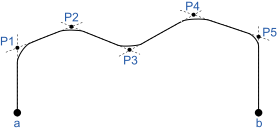
Symbol Description a Start b End Important concerns for use of Arch
Actual arch motion trajectory cannot be guaranteed since the arch motion is comprised of vertical motion and horizontal motion executed on trajectory control. The trajectory may change depending on motion speed or Arm motion. Check the actual trajectory with actual speed and posture used in operation.- Even if Jump command with the same arch number is executed at the same position, trajectory in low speed mode becomes lower than that of in high speed mode. Therefore, even if collision with obstacle is not seen in high speed mode, the manipulator may hit with obstacle in low speed mode.
- Vertical lift distance tends to increase and vertical-drop distance tends to decrease in high speed mode compared to low speed mode. When the fall distance of the trajectory is shorter than expected, lower the speed and/or the deceleration, or set the fall distance larger.
- Even if Jump command with the same distance and speed is executed, the trajectory may change due to the motion of the manipulator arms.
Potential errors
When the majority of depart (approach) motion uses the same joint as the span motion
An acceleration error may occur during an arch motion executed by the Jump3 andJump3CP commands. This error occurs frequently when the majority of the motion during depart or approach uses the same joint as the span motion. To avoid this error, reduce the acceleration/deceleration speed of the span motion using Accel command for Jump3 or using AccelS command for Jump3CP. Depending on the motion and orientation of the manipulator, it may also help to reduce the acceleration and deceleration of the depart motion (approach motion) using the AccelS command.
Example
When the depart coordinate is P1, the approach start coordinate is P2, and the target coordinate is P3 without options.
| Command | Response |
| 07D2H 0070H 0001H 0002H 0003H | 07D2H 0000H 0000H |