Approach Check Area Settings
These commands set and acquire the approach check area (Box). The approach check area is for checking approaches of the robot end effector in the approach check area. The position of the end effector is calculated by the current tool. The approach check area is set on the base coordinate system of the manipulator and is between the specified maximum and minimum X, Y, and Z.
When the approach check area is used, the system detects approaches in any motor power status during the controller is ON.
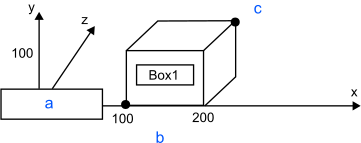
| Symbol | Description |
|---|---|
| a | Manipulator |
| b | Lower limit of axes X, Y, Z |
| c | Upper limit of axes X, Y, Z |
Lower limit of axes X, Y, Z is (100, 0, 0) and upper limit is (200, 100, 100)
Robot parameter data is stored to the memory card in the Controller. Therefore, execution of the command writes to the memory card. Frequent writing to the memory card affects its product life. It is recommended to minimize the execution of the command.
- Turning Off Approach Check Area by coordinate axis
You can turn off the approach check area of each coordinate axis. To turn off only the Z axis, define the lower limit position and the upper limit position of the Z axis to be 0. - Default values of Approach Check Area
The default values for the Box statement are "0, 0, 0, 0, 0, 0". (Approach Check Area Checking is turned off.) - Tool selection
The approach check is executed for the current tool. When you change the tool, the approach check may display the tool approach from inside to outside of the area or the other way although the robot is not operating.