Motion Commands
These commands are used to move the Arm to a target position in various ways.
Following is the description common in each command. Note that some functions are not available depending on the commands. Follow the descriptions of each command.
Setting of Target Position
This section describes method of designation for the target position.Setting by Point Number
This method specifies the target position by a point number. The point should be defined beforehand to use this method.Setting by Pallet
This method specifies the pallet number and position in the defined pallet. There are two methods to specify the position.- A: Specify the divided position directly.
- B: Specify by the division coordinate.
The pallet can be defined by dividing the area of P1, P2, and P3 by 3×5 as follows.
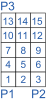
For setting-by-position method, specify the position you want to move to by a number ranging from 0 to 15. For setting-by-coordinate method, specify the row and line. To move to the position “1”, specify (1, 1). For the position “2”, specify (2, 1). And for the position “8”, specify (2, 3).
- Speed / Accel setting
By setting Speed/Accel to the option of the motion command, the command will be executed after setting Speed/Accel only by issuing the motion command. This can save the number of command issues. However, prior registration of Speed/Accel table is necessary.