Command 2005: Moves the arm from the current position to the specified position in a linear interpolation motion
Moves the manipulator from the current position to a target position using linear interpolated motion.
Command Syntax
- Option
Specify the target position specifying method and each option. The number of necessary parameters varies depending on the specified options. Speed / Accel setting and target position specifying method affect the number of parameters. Other options do not affect the number of parameters. For Parameter 2 and later for options, follow the descriptions (2) and later.
| bit | Name | Description | |
|---|---|---|---|
| Parameter 1 | 15 | Till / Find | Specify Till and Find options. 0 = not specify 1 = Till 2 = Find |
| 14 | |||
| 13 | Parallel processing | Select whether to use a parallel processing 0 = No 1 = Yes | |
| 12 | CP | Select whether to use a path motion 0 = No 1 = Yes | |
| 11 | Speed / Accel | Specify whether to set Speed / Accel before executing the motion command. 0 = do not set 1 = set only Speed 2 = set only SpeedS 3 = set only SpeedR 4 = set only Accel 5 = set only AccelS 6 = set only AccelR 7 = set Speed and Accel 8 = set SpeedS and AccelS 9 = set SpeedR and AccelR | |
| 10 | |||
| 9 | |||
| 8 | |||
| 7 | ROT | Give priority to tool orientation change and determine motion speed and acceleration / deceleration 0 = do not use 1 = use | |
| 6 | Reserved | Specify “0”. | |
| | | |||
| 3 | |||
| 2 | Target position specifying method | Select the specifying method of the target position 0 Setting by point number 1 Setting by position in the pallet 2 Setting by coordinate in the pallet | |
| 1 | |||
| 0 |
- When selected “Setting by point number” for Target position specifying method and “do not set” in Speed / Accel.
In this case, use until Parameter 2.
Command No., Parameter 1, Parameter 2
| bit | Name | Description | |
|---|---|---|---|
| Parameter 2 | 15 | pointNumber | Specifies the target position by a point number |
| 14 | |||
| | | |||
| 1 | |||
| 0 |
- When selected “Setting by position in the pallet” for Target position specifying method and “do not set” in Speed / Accel.
In this case, use until Parameter 3.
Command No., Parameter 1, Parameter 2, Parameter 3
| bit | Name | Description | |
|---|---|---|---|
| Parameter 2 | 15 | palletNumber | Specifies the pallet number to be used |
| 14 | |||
| | | |||
| 1 | |||
| 0 |
| bit | Name | Description | |
|---|---|---|---|
| Parameter 3 | 15 | position | Specifies the pallet position |
| 14 | |||
| | | |||
| 1 | |||
| 0 |
- When selected “Setting by coordinate in the pallet” for Target position specifying method and “do not set” in Speed / Accel.
In this case, use until Parameter 4.
Command No., Parameter 1, Parameter 2, Parameter 3, Parameter 4
| bit | Name | Description | |
|---|---|---|---|
| Parameter 2 | 15 | palletNumber | Specifies the pallet number to be used |
| 14 | |||
| | | |||
| 1 | |||
| 0 |
| bit | Name | Description | |
|---|---|---|---|
| Parameter 3 | 15 | row | Specifies the row in the pallet |
| 14 | |||
| | | |||
| 1 | |||
| 0 |
| bit | Name | Description | |
|---|---|---|---|
| Parameter 4 | 15 | line | Specifies the line in the pallet |
| 14 | |||
| | | |||
| 1 | |||
| 0 |
- When selected “Setting by point number” for Target position specifying method and “set Speed and Accel” in Speed / Accel.
In this case, use until Parameter 3.
Command No., Parameter 1, Parameter 2, Parameter 3
| bit | Name | Description | |
|---|---|---|---|
| Parameter 2 | 15 | palletNumber | Specifies the pallet number to be used |
| 14 | |||
| | | |||
| 1 | |||
| 0 |
| bit | Name | Description | |
|---|---|---|---|
| Parameter 3 | 15 | Speed / SpeedS / SpeedR | Specifies the speed table number of the selected type by an integer from 0 to 15. *Specify “0” if acceleration and deceleration are not set. |
| | | |||
| 8 | |||
| 7 | Accel / AccelS / AccelR | Specifies the acceleration/deceleration table number of the selected type by an integer from 0 to 15. *Specify “0” if acceleration and deceleration are not set. | |
| | | |||
| 0 |
- When selected “Setting by position in the pallet” for Target position specifying method and “set Speed and Accel” in Speed / Accel.
In this case, use until Parameter 4.
Command No., Parameter 1, Parameter 2, Parameter 3, Parameter 4
| bit | Name | Description | |
|---|---|---|---|
| Parameter 2 | 15 | palletNumber | Specifies the pallet number to be used |
| 14 | |||
| | | |||
| 1 | |||
| 0 |
| bit | Name | Description | |
|---|---|---|---|
| Parameter 3 | 15 | position | Specifies the pallet position |
| 14 | |||
| | | |||
| 1 | |||
| 0 |
| bit | Name | Description | |
|---|---|---|---|
| Parameter 4 | 15 | Speed / SpeedS / SpeedR | Specifies the speed table number of the selected type by an integer from 0 to 15. *Specify “0” if acceleration and deceleration are not set. |
| | | |||
| 8 | |||
| 7 | Accel / AccelS / AccelR | Specifies the acceleration/deceleration table number of the selected type by an integer from 0 to 15. *Specify “0” if acceleration and deceleration are not set. | |
| | | |||
| 0 |
- When selected “Setting by coordinate in the pallet” for Target position specifying method and “set Speed and Accel” in Speed / Accel.
In this case, use until Parameter 5.
Command No., Parameter 1, Parameter 2, Parameter 3, Parameter 4, Parameter 5
| bit | Name | Description | |
|---|---|---|---|
| Parameter 2 | 15 | palletNumber | Specifies the pallet number to be used |
| 14 | |||
| | | |||
| 1 | |||
| 0 |
| bit | Name | Description | |
|---|---|---|---|
| Parameter 3 | 15 | row | Specifies the row in the pallet |
| 14 | |||
| | | |||
| 1 | |||
| 0 |
| bit | Name | Description | |
|---|---|---|---|
| Parameter 4 | 15 | line | Specifies the line in the pallet |
| 14 | |||
| | | |||
| 1 | |||
| 0 |
| bit | Name | Description | |
|---|---|---|---|
| Parameter 5 | 15 | Speed / SpeedS / SpeedR | Specifies the speed table number of the selected type by an integer from 0 to 15. *Specify “0” if acceleration and deceleration are not set. |
| | | |||
| 8 | |||
| 7 | Accel / AccelS / AccelR | Specifies the acceleration/deceleration table number of the selected type by an integer from 0 to 15. *Specify “0” if acceleration and deceleration are not set. | |
| | | |||
| 0 |
Response Syntax
Refer to the following.
Description
Moves the arm from the current position to destination in a straight line. This command moves all axes to start and stop at the same time. The coordinates of the target position must be taught previously before executing the command. Acceleration and deceleration of the command is controlled by the AccelS command and speed is controlled by the SpeedS command. If the SpeedS value exceeds the allowable speed for any joint, power to all four joint motors will be turned off, and the manipulator will stop.
Move uses the SpeedS speed value and AccelS acceleration and deceleration values. For the relation between the speed/acceleration and the acceleration/deceleration, refer to Using Move with CP below. However, if the ROT modifier parameter is used, Move uses the SpeedR speed value and AccelR acceleration and deceleration values. In this case, SpeedS speed value and AccelS acceleration and deceleration value have no effect.
Usually, when the move distance is 0 and only the tool orientation is changed, an error will occur. However, by using the ROT parameter and giving priority to acceleration and deceleration of the tool rotation, the manipulator can be moved without an error. When there is no orientation change and movement distance is not 0 with the ROT modifier parameter, an error will occur.
Also, when the tool rotation is significantly large compared to the moving distance, and when the rotation speed exceeds the specified manipulator speed, an error will occur. In this case, reduce the speed or append the ROT modifier parameter to give priority to the acceleration and deceleration.
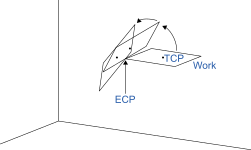
The optional Till qualifier allows the user to specify a condition where the manipulator decelerates to stop before completing the Move. The user can check if the input is On or Off and make the arm to stop based on the specified condition . This feature works like an interrupt where the Move is interrupted (stopped) once the Input condition is met. If the input condition is never met during the Move then the arm successfully arrives on the point specified as the target position.
To use the Till qualifier, the condition must be specified by the Till setting command beforehand.
Notes
Move Cannot Execute Range Verification Prior To Motion
Move cannot execute range verification of the trajectory prior to motion. Therefore, even if the target position is within an allowable range, it is possible for the system to find a prohibited position along the way to a target point. In this case, the arm may abruptly stop and cause shock to the servo, resulting in failure. To prevent this, be sure to perform range verifications at low speed prior to using Move at high speeds. In summary, even though the target position is within the range of the arm, the arm cannot reach the position if the trajectory has intermediate points which are out of the physical motion range of the arm.Using Move with CP
The CP parameter causes the arm to move to the target position without decelerating or stopping at the point. This allows the user to string commands and execute a series of motion commands at a constant speed. The Move instruction without CP always causes the arm to decelerate to stop before reaching the target point.Proper Speed and Acceleration Instructions with Move
The SpeedS and AccelS commands are used to specify the speed and acceleration of the manipulator during Move motion. Note that SpeedS and AccelS are applied to the linear and circular interpolated motion while point to point motion uses the Speed and Accel instructions.Potential Errors
Attempt to execute motion with Linear distance is 0
Move command causes errors when you attempt to execute motion to change only U coordinate value of four-degree-of-freedom manipulators (SCARA including RS series) or U, V, and W coordinate values of six-degree-of-freedom manipulators (vertical 6-axis manipulators). In this case, use the ROT parameter.Joint Overspeed Errors
When even one of the axes exceeds its allowable speed during rmotion, an overspeed error will occur. In this case, the arm stops moving and the motor excitation turns OFF.
Attempt to Pass the Origin Point (RS series)
If RS series manipulator attempts to pass the point near the origin point by Move command, an overspeed error may occur. For commands which pass near the origin point, take the following countermeasures.- Lower the SpeedS value
- Take a different path to avoid the origin point
- Use PTP motion such as Go command instead of Move command.
Example
When specifying P1 by point number determination without an option.
| Command | Response |
| 07D5H 0000H 0001H | 07D5H 0000H 0000H |
When specifying Pallet 15 by pallet position determination, with position =10, without an option.
| Command | Response |
| 07D5H 0001H 000FH 000AH | 07D5H 0000H 0000H |
When specifying Pallet 15 with row = 1 Line = 3 by pallet coordinate determination without an option.
| Command | Response |
| 07D5H 0002H 000FH 0001H 0003H | 07D5H 0000H 0000H |
When specifying P1 by point number determination, with Speed/Accel= set Speed only, Table number = 8.
| Command | Response |
| 07D5H 0100H 0001H 0800H | 07D5H 0000H 0000H |