CP Control
These commands are used to set CP (Continuous Path) motion.
CP (Continuous Path) motion can be used for the following commands:
Arc, Arc3, Go, Jump, Jump3, Jump3CP, Move
When CP is On, each motion command executes the next statement as deceleration starts. Continuous path motion will continue regardless of whether the CP parameter is specified in each motion command or not.
When CP is Off, this function is active only when the CP parameter is specified in each motion command.
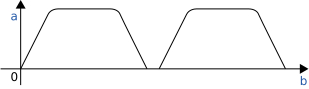
- Normal Motion
- Path Motion
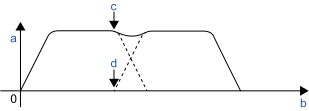
| Symbol | Description |
|---|---|
| a | speed |
| b | time |
| c | Start deceleration |
| d | Start acceleration |
When CP is On, path motion will continue without full deceleration between two CP motion (Arc, Arc3, Jump3, Jump3CP, Move), or two PTP motion (Go, Jump). In contrast, full deceleration will occur between a CP motion and a PTP motion.
In the following cases, CP is Off.
- Controller startup
- Reset
- All task stop
- Switching the Auto / Programming operation mode
- Motor On
- SFree, SLock are executed