[New File] (File Menu)
 : Ctrl + N
The New command is used to add new files to the current project.
When the [New File] is selected, the [New File] dialog is opened.
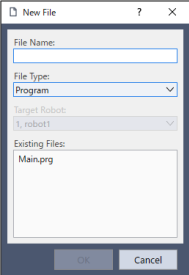
| Item | Description |
|---|---|
| File Name | Enter a name for the new file in this box. Up to 24 characters can be input. |
| File Type | You can also specify program files, include files, point data, and force data. |
| Target Robot | Select the robot to which you want to apply the point file or force file.
|
| Existing Files | Shows the files for the selected type currently in the Project folder. |
| OK | Creates a new file. |
| Cancel | Cancels the operation. |