[PC to Controller Communications] Command (Setup Menu)

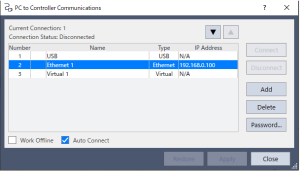
To configure communications with the Controller, select [PC to Controller Communications] from the [Setup] menu. The [PC to Controller Communications] dialog will be displayed as shown below:
| Item | Description |
|---|---|
| ▼▲ | Sorts the connection list. Connection #1 “USB” cannot be changed. |
| No. | Sets the connection number. You can set up to 99 connections. Connection #1 “USB” cannot be changed. |
| Name | Renames the connection. Connection #1 “USB” cannot be changed. |
| Controller series | Configures the connecting Controller series. If the connection type is Ethernet, you can change the Controller.
|
| Connection type | Shows the connection type.
|
| IP Address | Sets the IP address of the "Ethernet" connection. |
| Connect | Connect the selected communication. |
| Disconnect | Disconnect the communication. |
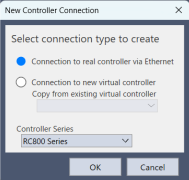
| Add | Add communication information of Ethernet or a virtual controller. "No." is automatically assigned to the lowest unused number. Clicking this button opens the dialog to specify the communication type.
|
| Delete | Deletes selected communication information. Connection #1 “USB” cannot be deleted. The deleted "No." becomes a missing number, and the "No." of other connections will not change. |
| Password | Sets authentication passwords for the Ethernet connecting Controller and PC connection destination. |
| Work Offline | You can build a project without connecting to the controller in Offline mode. Some functions such as Robot Manager are not available in this mode. |
| Auto Connect | Performing an operation that requires a Controller connection (execute build, start Robot Manager) while a Controller is not connected, will automatically connect to the last Controller connection. |
| Restore | Revert back to previous values. |
| Close | Closes the dialog box. |
| Apply | Saves changes. |
KEY POINTS
Epson RC+ Lite Edition does not allow connection to a virtual controller.
KEY POINTS
Changing the connection number (by using the▼▲, deleting connections, or other operations) may affect the RC+ API application. Be careful when you set the alternative models.
KEY POINTS
Program total execution time:
With licenses up to Epson RC+ Basic Edition, the total execution time of programs in the virtual controller is limited to one hour. If total execution is over one hour, a warning message appears. You can execute the program again after the warning is displayed. The total execution timer will be reset.
KEY POINTS
Depending on the network environment your PC is connected to, you may not be able to connect to a virtual controller.
If you are unable to connect to a virtual controller, try to connect using the following steps.
- Open the command window.
- Run the following commands.
> VirtualControllerPort, Destination connection number, Port number- Destination connection number
- Connection number of the virtual controller you want to connect to.
- Port number
- Unused port number on the PC (15000 to 49151)
- Connect to the virtual controller with the destination number specified in the above command.
* If the 1865 error occurs when connecting, specify a different port number at step 2 and try connecting again.