[Setup]-[Preferences]-[Status Window] Page
This page allows you to change preferences for the Status window.
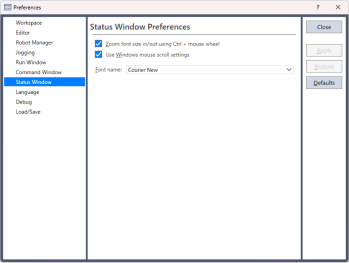
| Item | Description |
|---|---|
| Zoom font size in/out Ctrl + mouse wheel | Move the mouse wheel up or down while holding down the Ctrl key to zoom the font size in and out on the Status window. This is turned on by default. |
| Link with the scroll rows of Windows mouse settings | Links with the Windows mouse settings (*1) and changes the number of scroll rows of the Status Window. This is turned on by default. |
| Font Name | Click on the Font button to change the font for the Status window. |
*1: Indicates the following settings in [Windows Start]-[Settings]-[Bluetooth & devices]-[Mouse]-[Scrolling] (for Windows 11 23H2):
- Roll the mouse wheel to scroll
- Lines to scroll at a time