Overview
Conveyor Tracking is a process in which a robot picks up parts from a stationary or moving conveyor that are found by a vision system or sensor.
When a sensor or vision camera detects a workpiece on the conveyor, the Controller's I/O input latches the encoder's pulse value corresponding to the conveyor's rotational position at that moment. The workpiece position on the moving conveyor is then calculated and tracked based on the latched position and the pulse values generated by the subsequent rotation of the conveyor.
The Epson RC+ 8.0 Conveyor Tracking option supports both tracking and indexed conveyor systems.
Tracking conveyor system
Conveyor moves constantly. Vision system or sensor system finds the parts on it and robot picks them up as they move. During tracking, the robot can move along with the part as it picks up parts.
Indexed conveyor system
Conveyor moves a specified distance and then stops. The vision system finds the parts and robot picks up each part. After finding and picking up all parts, the conveyor moves again.
Up to 16 logical conveyors can be defined in each project. To define a logical conveyor, set a conveyor number, a robot number, encoder and select vision or sensor.
Multiple conveyors and multiple-robot conveyors are supported.
Applicable conveyor tracking models and connection methods are shown below.
| Controller | Supported/Not Supported | Connection Method | |
|---|---|---|---|
| Conveyor Tracking Option Kit B | Pulse Generator (PG) Board | ||
| RC90 Series | Supported | Not supported | Max 2 boards supported |
| RC700-A | Supported | Not supported | Max 4 boards supported |
| RC700-D, RC700-E | Supported | Not supported | Max 3 boards supported |
| T series Manipulator | Not supported | - | - |
| VT series Manipulator | Not supported | - | - |
| RC800 series (*1) | Supported | Supported | Max 3 boards supported |
*1: Not supported by some of the RC800 series.
For details on multi robots, refer to the following manual.
"Robot Controller Manual"
There are two types of conveyors that can be used with the Conveyor Tracking option: straight conveyors and circular conveyors, as shown in the figure below. These conveyors have different calibration and programming methods.
- Straight conveyor tracking system
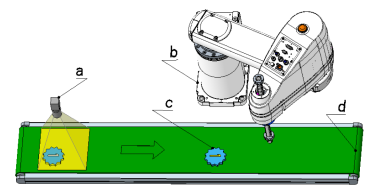
| Symbol | Description |
|---|---|
| a | Camera |
| b | Robot |
| c | Workpiece |
| d | Straight conveyor |
- Circular conveyor tracking system
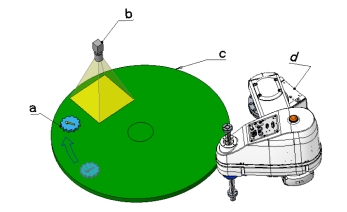
| Symbol | Description |
|---|---|
| a | Workpiece |
| b | Camera |
| c | Circular conveyor |
| d | Robot |