Vision calibration sequence
Before you can calibrate a vision conveyor, you must first create a calibration sequence. This sequence is used by the system during the calibration process and must be linked to a camera calibration. The conveyor system commands use camera coordinates in millimeters. Although you can use any type of Vision Guide camera calibration, you only need to use a Standalone calibration.
The calibration sequence needs a sequence that uses one object for each workpiece.
Place two workpieces on the conveyor as shown below.
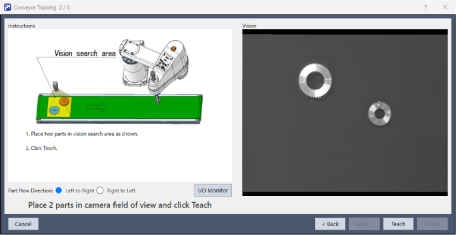
It is recommended to place the two parts diagonally in the field of view. Also, the first object of a sequence must be taught with the robot as Part 1. The second object of a sequence must be taught with the robot as Part 2.
To make it as easy as possible for operators to calibrate the conveyor, the parts that will be found in the vision sequence should be located such that part 2 is after part 1 in the direction of part flow. In the figure below, object 1 in the vision sequence is Corr01, which locates Part 1. Object 2 is Corr02, which locates Part 2.
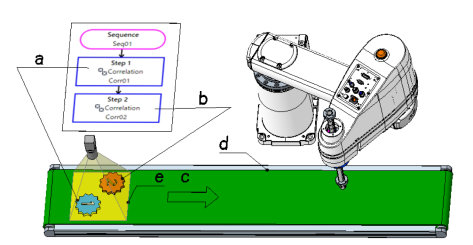
| Symbol | Description |
|---|---|
| a | Work 1 |
| b | Work 2 |
| c | Direction of the conveyor motion |
| d | Conveyor |
| e | Vision search area. |
KEY POINTS
When calibrating the vision conveyor tracking, pay attention to the followings to calibrate properly.
- Link Workpiece 1 with Vision Sequence 1, and Workpiece 2 with Vision Sequence 2 in the settings.
- As the workpiece placement in Vision Guide changes according to the camera orientation, check which is Workpiece 1 in Vision Guide beforehand.
The figure below shows an example of how the position of the workpiece displayed in Vision Guide changes depending on the camera orientation.
For details about the Vision Guide coordinate system, see below.
"Vision Guide 8.0 Software - Vision Guide Overview - Coordinate System"
Camera installation example 1
Workpieces 1 and 2 are displayed vertically on the Vision screen.
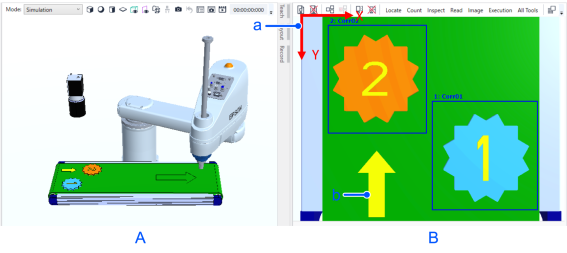
| Symbol | Description |
|---|---|
| A | Camera Installation diagram |
| B | Vision screen |
| a | Image coordinate system in Vision |
| b | Direction of the conveyor motion |
Camera installation example 2
When the camera is rotated 90° from the state in camera installation example 1. Workpieces 1 and 2 are displayed horizontally on the Vision screen.
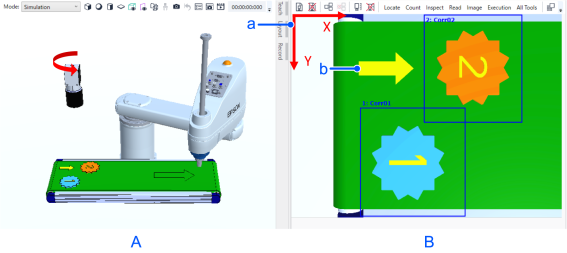
| Symbol | Description |
|---|---|
| A | Camera Installation diagram |
| B | Vision screen |
| a | Image coordinate system in Vision |
| b | Direction of the conveyor motion |