System Structure
The conveyor system configurations and trigger methods are as shown below.
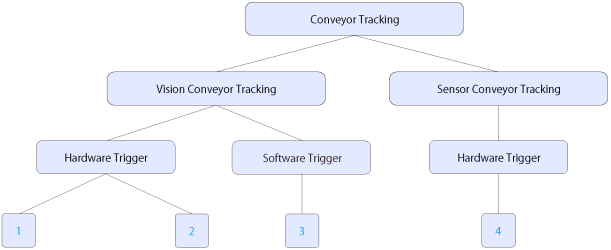
| PG Board Connection | Conveyor Tracking Option Kit B Connection | Trigger Method | Description | |
|---|---|---|---|---|
| 1 | 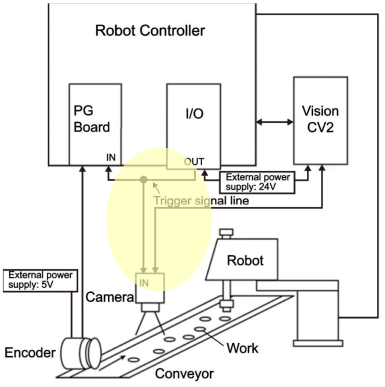 | 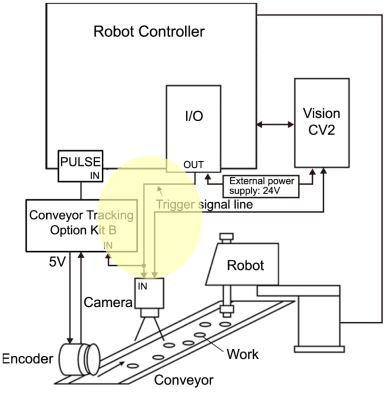 | Hardware trigger | This method latches the camera image and encoder count using trigger signals from the robot controller I/O output. [Detection by vision only] |
| 2 | 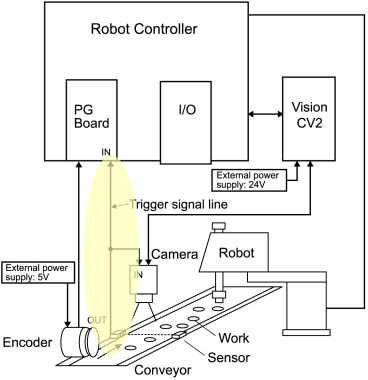 | 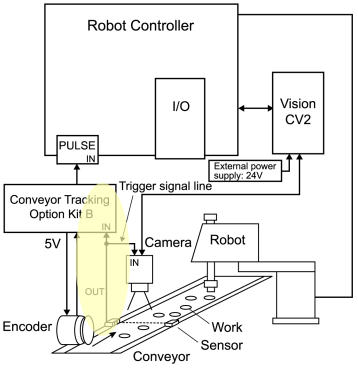 | Hardware trigger | This method latches the camera image and encoder count using trigger signals from the photoelectric sensor output. [Detection by vision + sensor] |
| 3 | 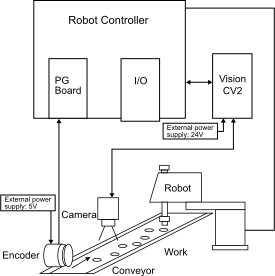 | 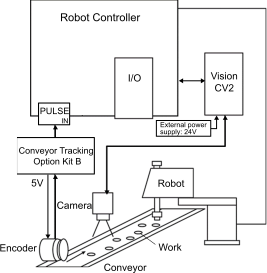 | Software trigger | This method latches the camera image and encoder count using the command from the software (Epson RC+), without using trigger signal. A delay occurs compared to the hardware trigger due to the time it takes to process the command. [Detection by vision only] |
| 4 | 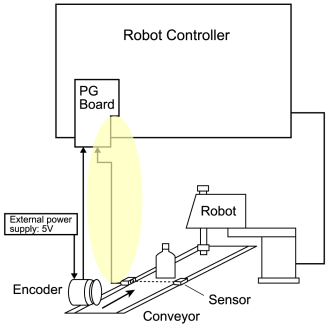 | 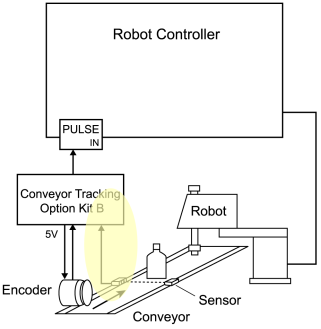 | Hardware trigger | This method latches the encoder count using the photoelectric sensor output. In the case of a sensor conveyor, the position is estimated based only on the workpiece identification output by a photoelectric sensor, without using a camera. (Because displacement cannot be detected in the width direction of the conveyor, a guide or other device is required to regulate any displacement in the width direction.) [Detection by sensor only] |
There are hardware trigger and software trigger as trigger methods for latching the camera image and encoder count.
| Hardware trigger | Software trigger | ||
|---|---|---|---|
| Use cases |
|
| |
| Overview | A configuration that latches via an external trigger signal from a photoelectric sensor, controller I/O, etc., synchronizing the camera image with the encoder count. | A configuration that latches the encoder count via the "Cnv_Trigger" software command, without using an external trigger. | |
| Characteristics | **Pros ** The timing can be adjusted with high precisions as a physical trigger signal is used to synchronize camera imaging and encoder counting, making it suitable for imaging moving workpieces. It is especially important to improve synchronization accuracy when the conveyor speed is high and displacement between the imaging and encoder latch timing can easily affect accuracy. **Cons ** The trigger cable must be wired to the camera, PG board or Conveyor Tracking Option Kit B. | **Pros ** Simple system configuration as no trigger signal wiring is required. **Cons ** As the camera capture commands and the encoder count commands are issued separately in the SPEL sequence code, the camera capture timing and encoder latch timing vary according to the communication speed and the amount of vision processing calculations. This timing variation adversely affects the conveyor tracking accuracy. | |