Conveyor Object
KEY POINTS
Conveyor tracking simulation is available only with Epson RC+ Standard Edition and Premium Edition. Refer to the following video manual for an overview and detailed instructions.
Sample connections and projects are provided for conveyor tracking simulation. It is also used in the video manual mentioned above.
From the Epson RC+ 8.0 menu, select [Project]-[Open], then select [Projects]-[SimulatorDemos]-[ConvTrack_GX8_C], and then select [RC800 Series]–[CnvTrack GX8-C] from the Epson RC+ 8.0 toolbar-[Connection:] list box. You can actually check the operations and behaviors described in the video manual.
Conveyor objects can be operated only with Epson RC+ Standard Edition and Premium Edition.
Conveyor
Most of the attributes are the same as for Layout objects, but some attributes are only valid for Conveyor objects.
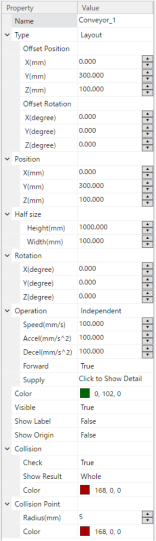
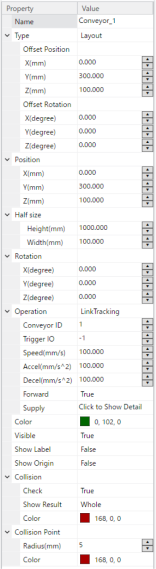
| Property | Value |
|---|---|
| Name | You can specify any name. |
| Type | Setting fixed to "Layout". |
| Offset Position | You can show/set the position of an object as an offset from its parent object. If no parent object exists, it is shown/set the same as the Position property. |
| Offset Rotation | You can show/set the placement angle of an object as an offset from its parent object. If the parent object does not exist, it will display/set the same as the Rotation property. |
| Position | Specifies the center point in simulator World coordinates. |
| Half size | Specify a length from the center. The length is double the specified length. Specified by height (Conveyor length) and width (Conveyor width). |
| Rotation | Specify the placement angle. |
| Operation | Specifies the motion type of the Conveyor object (whether or not it is linked to the Conveyor Tracking setting). In the case of "LinkTracking", it is linked to the conveyor tracking settings. This robot can perform conveyor tracking to follow workpieces (parts) moving along a conveyor object. Also, the value obtained by the Cnv_QueGet function differs according to the operation type. The value will fluctuate if "LinkTracking" is selected to link to the conveyor tracking setting. However, the value does not fluctuate if "Independent" is selected.
|
| Color | You can change the display color. Click the drop-down  to change it. The display color setting dialog box is displayed. to change it. The display color setting dialog box is displayed. For details, refer to "Change layout object color" below. Layout Objects |
| Visible |
|
| Show Label |
|
| Show Origin |
|
For details about the Collision and Collision Point properties, see the properties below.
Operation
| Property | Value |
|---|---|
| Conveyor ID | If the conveyor object motion type is "LinkTracking", specify the conveyor number for which conveyor tracking is set. |
| Trigger IO | If the conveyor object motion type is "LinkTracking", specify the I/O output number for the encoder count to latch. |
| Speed | Specify the motion speed of the conveyor object. |
| Accel | Specify the acceleration of the conveyor object. |
| Decel | Specify the deceleration of the conveyor object. |
| Forward | Enable/Disable the forward direction as the conveyor object motion direction.
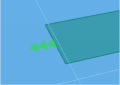 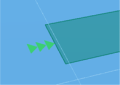 Normally, use this with the setting set to True. Set this to False when you want to return the workpiece (part) toward the reverse direction side (upstream side). When set to False, automatic supply and automatic removal of workpieces (parts) cannot be used (this operates the same as when "Remove Type" is set to "None" in the Supply Setting dialog). In addition, conveyor tracking simulation cannot be used. |
| Supply | This sets the supply of workpieces (parts) that move on the conveyor object. |
Set the supply of workpieces (parts) that move on the conveyor object.
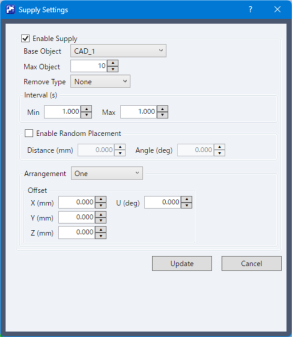
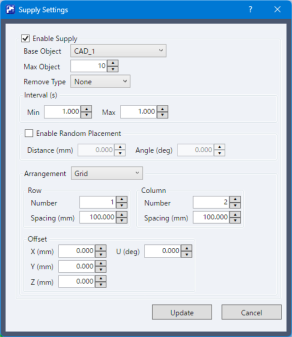
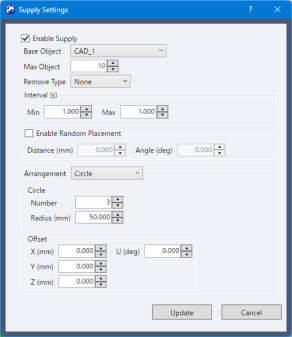
To set or change the workpiece (parts) that flow on the conveyor object, click the  [Click to Show Detail] button for the setting value of the Supply property. A supply setup dialog box appears.
| Item | Description |
|---|---|
| Supply enable | Enable/Disable supply of workpieces (parts) to the conveyor object When enabled, various settings are available.
|
| Base Object | The object used as the workpiece (part) You can select layout objects that are already placed in 3D. When a base object is set, a preview is displayed near the starting point of the conveyor object according to the [Arrangement] setting described later. 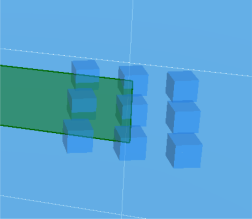 |
| Max. Quantity | Maximum quantity of supplied workpieces (parts) |
| Delete type | Workpiece (part) deletion method Specifies how to handle workpieces (parts) that reach the end of the conveyor object.
|
| Interval | Time interval (seconds) between workpieces (parts) being fed
If the values are different, the workpieces (parts) are fed at random time intervals between the minimum and maximum values. |
| Random placement enable | Enable/Disable random placement of workpieces (parts)
|
| Placement | Workpiece (part) placement method Select one of the following methods.
|
Rows Columns | When workpiece (part) placement method is set to "Grid" Define the grid with [Quantity] and [Interval], and place the workpieces (parts). |
| Radius | When workpiece (part) placement method is set to "Circle" The workpieces (parts) specified in [Quantity] are placed on an arc with the radius specified here. |
| Offset | Offset value from the origin of the conveyor object Sets the [Grid] or [Circle] placement with the offset value specified here as the center. |
Manipulating conveyor objects
Select and right-click a conveyor object in the layout tree or 3D display to display the following context menu.
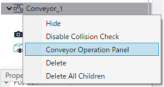
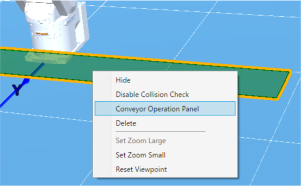
When you select "Conveyor Operation Panel", the following dialog box appears.
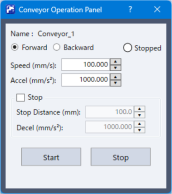
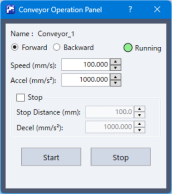
| Item | Description |
|---|---|
Forward Backward | Specify the motion direction of the conveyor object.
|
Speed Accel | Motion speed and acceleration of the conveyor object. These correspond to the Speed and Accel property values of the conveyor object, respectively. |
| Abort | Enable/Disable the stopping operation for the conveyor object When selected, the stopping operation for the conveyor object is enabled, causing the conveyor object to stop with the specified stopping distance and deceleration. The deceleration corresponds to the Decel property value of the conveyor object. If disabled, the conveyor object does not stop until the [Stop] button is clicked.
|
Start Abort | Start/Stop the conveyor object movement Click the [Start] button to start the conveyor object. Click the [Stop] button to stop the conveyor object. |
Running Stopped | Indicator showing the operating status of the conveyor object When you click the [Start] button or use the SimSet command to start the conveyor object operation (by specifying the Start property), this indicator switches from "Stopped" to "Running". When you click the [Stop] button or use the SimSet command to stop the conveyor object operation (by specifying the Stop property), this indicator switches from "Running" to "Stopped".   |