Detection area object
Detection area objects can be operated only with Epson RC+ Standard Edition and Premium Edition.
DetectionArea
This object detects contact with other objects. When placed on a conveyor object, it can be used as a sensor to detect workpieces (parts) moving on the conveyor.
Most of the attributes are the same as for Layout objects, but some attributes are only valid for detection area objects.
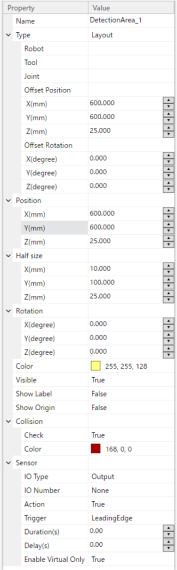
| Property | Value |
|---|---|
| Name | You can specify any name. |
| Type | Setting fixed to "Layout". Cannot change the setting. |
| Offset Position | You can show/set the position of an object as an offset from its parent object. If no parent object exists, it is shown/set the same as the Position property. |
| Offset Rotation | You can show/set the placement angle of an object as an offset from its parent object. If the parent object does not exist, it will display/set the same as the Rotation property. |
| Position | Specifies the center point in simulator World coordinates. |
| Half size | Specify a length from the center. Specified by X, Y, Z. The length is double the specified length. |
| Rotation | Specify the placement angle. |
| Color | You can change the display color. Click the drop-down  to change it. The display color setting dialog box is displayed. to change it. The display color setting dialog box is displayed. For details, refer to "Change layout object color" below. Layout Objects |
| Visible |
|
| Show Label |
|
| Show Origin |
|
| Collision Check | Enable/Disable detection operation
1. Ensure that it is positioned so that it does not come into contact with objects for which contact detection is not required. 2. If contact is unavoidable, consider setting the Collision Check property of the object for which contact detection is not required to False. |
| Collision Color | Specifies the color used when contact occurs with another object (excluding conveyor objects), including workpieces (parts). When the Collision Check property is True, the color changes to the color specified by this property when contact occurs with another object, including workpieces (parts). When the objects are no longer in contact, the color returns to the color set in the Color property. 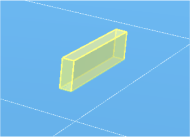 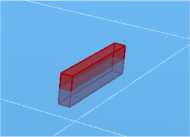 |
Sensor
| Property | Value |
|---|---|
| IO Type | I/O output destination when an object is detected
|
| I/O Number | I/O number specified in [IO Type] |
| Action | I/O Output value Sets the output value for the output destination and I/O number specified in [IO Type] and [I/O Number].
|
| Trigger | I/O output timing setting Sets the I/O output timing when an object is detected.
|
| Duration | I/O output duration The I/O output is maintained for the specified period of time. |
| Delay | I/O output delay time I/O output after the specified time elapses. |
| Enable Virtual Only | Enabled/Disabled when a virtual controller is connected
|