SPEL_Jump
Description
Moves the arm using gate motion for a SCARA robot.
Common Inputs and Outputs
Reference: Function Blocks Common Inputs and Outputs
Inputs
- Point
- UINT Desired point number.
- TargetType
- UINT Specifies the method to reach the target position.
0 = Target specified by point number.
1 = Target specified by position in the pallet.
2 = Target specified by coordinates of the pallet.
- PalletNum
- UINT Desired pallet number.
- PalletPosOrCol
-
UINT TargetType=0 specifies 0.
UINT TargetType=1 specifies pallet position.
UINT TargetType=2 specifies pallet column.
- PalletRow
-
UINT TargetType=0 specifies 0.
UINT TargetType=1 specifies 0.
UINT TargetType=2 specifies pallet row.
- ArchNum
-
UINT Specifies arch
0-6 = using arch
7 = not using arch
- MaxTime
- DINT The maximum execution time allowed.
Operation
Reference: Function Blocks General Operation
For more details, refer to the following manual:
"SPEL+ Language Reference manual - Jump Statement"
Example
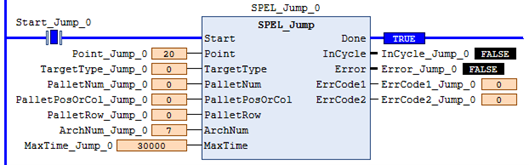
To move the robot to point P2 using gate trajectory, enter the value for Point and run the Function Block as shown below.
← SPEL_Jog SPEL_Jump3 →