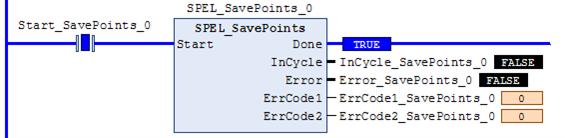
SPEL_SavePoints
Description
Saves the current point data in robot controller memory to the default point file for robot 1 (robot1.pts) in the robot controller. To use this command, a valid RC+ project must exist in the controller. Typically, SavePoints is used to save points taught using the SPEL_Teach Function Block. When the controller starts up, it loads the project and the default point file, so the saved points are in memory.
Do not use a point file except for robot1.pts.
Common Inputs and Outputs
Reference: Function Blocks Common Inputs and Outputs
Operation
Reference: Function Blocks General Operation
For more details, refer to the following manual:
"SPEL+ Language Reference manual - SavePoints Statement"
Example
To save all points in robot controller memory to the file robot1.pts in the robot controller, run the Function Block as shown below.