[Project]-[Properties]-[Operator Settings]-[Robot Manager]-[Function selection]
Use this page to configure the Robot Manager for operators.
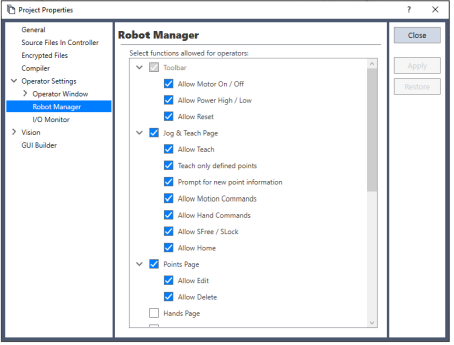
| Item | Description |
|---|---|
| Select functions allowed for operators | Check the pages that you want the operator to have access to when the Robot Manager is displayed from the operator window. In some pages, there are additional options. |
| Tool Bar | Sets items shown in the toolbar. This checkbox is selected by default and cannot be changed. |
| - Allow Motor On/Off | Allows the operator to switch the motor on or off. |
| - Allow Power High/Low | Allows the operator to switch the power high or low. |
| - Allow Reset | Allows the operator to reset the Emergency Stop status. |
| Jog & Teach Tab | Sets items shown in the [Jog & Teach] panel. |
| - Allow Teach | Allows the operator to teach points from the [Jog & Teach] page. |
| - Teach only defined points | Only defined points are shown in the point list on the [Jog & Teach] page. |
| - Prompt for new point information | When the operator teaches a new point, a dialog will be displayed for entering the point label and description. |
| - Allow Motion Commands | Allows the operator to execute motion commands from the [Jog & Teach] page. |
| - Allow Hand Operation | Allows the operator to execute hand commands from the [Jog & Teach] page. |
| - Allow SFree / SLock | Allows the operator to free or lock joints from the [Jog & Teach] page. |
| - Allow Home | Allows the operator to home the robot from the [Jog & Teach] page. |
| Points Page | Sets items shown in the Points Page. |
| - Allow Edit | Allows the operator to edit point data on the [Points] page. |
| - Allow Delete | Allows the operator to delete points on the [Points] page. |
| Hand settings tab | Allows the operator to view and edit the Hand Settings tab. |
| Force data tab | Allows the operator to view and edit the Force Data tab. |
| Arch settings tab | Allows the operator to view and edit the Arch Settings tab. |
| Local settings tab | Allows the operator to view and edit the Local Settings tab. |
| Tool settings tab | Allows the operator to view and edit the Tool Settings tab. |
| Arms tab | Allows the operator to view and edit the Arms tab. |
| Pallets tab | Allows the operator to view and edit the Pallets tab. |
| External control point settings | Allows the operator to view and edit the External Control Point Settings tab. |
| Boxes tab | Allows the operator to view and edit the Boxes tab. |
| Planes tab | Allows the operator to view and edit the Planes tab. |
| Weight tab | Allows the operator to view and edit the Weight tab. |
| Inertia tab | Allows the operator to view and edit the Inertia tab. |
| Mass setting tab | Allows the operator to view and edit the Mass Setting tab. |
| VRT tab | Allows the operator to view and edit the VRT tab. |
| XYZ Limits tab | Allows the operator to view and edit the XYZ Limits tab. |
| Range tab | Allows the operator to view and edit the Range tab. |
| Home Config tab | Allows the operator to view and edit the Home Config tab. |
| MCORDR setting tab | Allows the operator to view and edit the MCORDR Setting tab. |