Restoring Unsaved Files
If backed-up unsaved files are detected when Epson RC+ starts, the following dialog box appears.
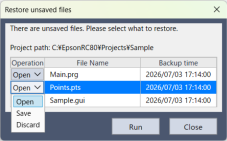
| Item | Description |
|---|---|
| Operation | Select how to process the unsaved files. "Open" is selected by default.
|
| File Name | Displays the names of the backed-up files. |
| Backup Date and Time | Displays the date and time when the backup was created. |
| Execute | The selected operation is performed for each file. |
| Close | You will be prompted to confirm whether to discard all unsaved files. If you click [OK], all backup files are deleted and no files are restored. |