程序示例 5.2
示例类型:
自定义平台(带孔) - 通过PF_Feeder回调函数控制振动
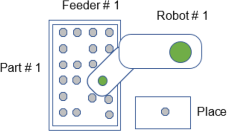
构成
- 机器人数量:1
- 送料器数量:1
- 送料器上的部件类型数量:1
- 配置位置数量:1
- 平台类型:孔
- 拾取区域:全面
- 相机的方向:固定向下相机
描述
由于是自定义平台,因此自动选择[通过PF_Feeder回调函数控制振动]。
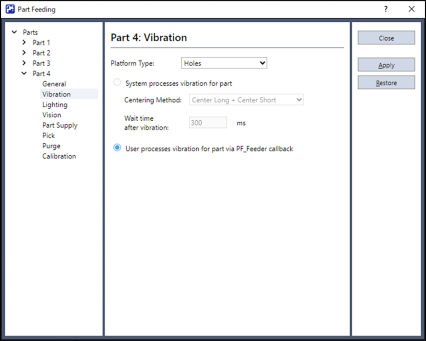
视觉系统获取图像并读入部件队列后,会调用PF_Feeder回调函数。用户代码用于判断在PF_Feeder回调函数内使送料器进行振动的方法。表面方向与背面方向的部件数由自变量提供给PF_Feeder回调函数。这些自变量为“NumFrontParts”与“NumBackParts”。在本例中,NumFrontParts大于“0”时,由于机器人可取放部件,因此无需送料器振动。在这种情况下,回调函数的返回值为“PF_CALLBACK_SUCCESS”。该返回值用于指示系统调用PF_Robot回调函数。
NumFrontParts为“0”时,样本代码用于执行VRun,然后执行部件Blob序列,以判断部件是否处于聚集状态,或者根本没有部件。如果通过部件Blob序列找不到部件,则会将料斗设为ON。部件Blob序列找到部件时,送料器会进行翻转运作、前移运作与后移运作,使部件落入孔中。部件在送料器上振动时,系统必定重新获取视觉图像。(这是因为部件位置因振动而发生了变化。)这是通过将返回值设为“PF_CALLBACK_RESTART”来实现的。这用于在重新获取新的图像并重新加载部件坐标队列后,判断是否需要再次调用PF_Feeder回调函数并进一步进行运作。
提示
翻转、长时间前移、短时间后移是各种自定义平台通用的有效运作。
要点
平台类型为孔、长槽或定位槽时,会将常数PF_FEEDER_UNKNOWN交接给PF_Feeder回调函数。这是因为自定义平台时,系统无法确定适当的送料器运作。
样本代码
Main.prg
Function main
    If Motor = Off Then
        Motor On
    EndIf
    Power Low
    Jump Park
    PF_Start 1
Fend
PartFeeding.prg
Function PF_Robot(PartID As Integer) As Integer
    Do While PF_QueLen(PartID) > 0
        P0 = PF_QueGet(PartID)
        Jump P0
        On Gripper; Wait 0.2
        Jump Place
        Off Gripper; Wait 0.2
        PF_QueRemove PartID
        If PF_IsStopRequested(PartID) = True Then
            Exit Do
        EndIf
    Loop
    PF_Robot = PF_CALLBACK_SUCCESS

Fend


Function PF_Feeder(PartID As Integer, NumFrontParts As Integer, NumBackParts As Integer, state As Integer) As Integer

' Example for Structured Platform with holes state = PF_FEEDER_UNKNOWN

    Integer PFControlReturnVal
    Integer numFound

    Select True

        ' OK to Pick
        Case NumFrontParts > 0
            ' Call PF_Robot because there are parts ready to pick
            PF_Feeder = PF_CALLBACK_SUCCESS '

        ' No Front parts were found but there are Back parts
        Case NumFrontParts = 0 And NumBackParts <> 0

            ' Flip, long Shift Forward and short Shift Backward
            PF_Flip PartID, 500
            PF_Shift PartID, PF_SHIFT_FORWARD, 1000
            PF_Shift PartID, PF_SHIFT_BACKWARD, 300

            PF_Feeder = PF_CALLBACK_RESTART ' Restart and re-acquire images

        ' There are no Front or Back parts found
        ' Either there is a clump of parts or there are no parts on the tray
        ' Acquire an image from the Part Blob sequence to make a determination
        Case NumFrontParts = 0 And NumBackParts = 0

            PF_Backlight 1, On ' Backlight on
            VRun PartBlob ' Acquire Image
            PF_Backlight 1, Off 'Backlight off
            VGet PartBlob.Blob01.NumberFound, numFound ' Were any Blobs found?

            If numFound > 0 Then ' Clump of parts found

                ' Flip, long Shift Forward and short Shift Backward
                PF_Flip PartID, 500
                PF_Shift PartID, PF_SHIFT_FORWARD, 1000
                PF_Shift PartID, PF_SHIFT_BACKWARD, 300

            Else ' No parts found

                ' Call the Control callback to supply more parts
                PFControlReturnVal = PF_Control(PartID, PF_CONTROL_SUPPLY_FIRST)
            EndIf

            PF_Feeder = PF_CALLBACK_RESTART ' Restart and re-acquire images

    Send

Fend