错误处理
程序示例 6.1
示例类型:
回调函数内的潜在错误状态的处理
构成
- 机器人数量:1
- 送料器数量:1
- 送料器上的部件类型数量:1
- 配置位置数量:1
- 相机的方向:送料器#1上的固定向下相机
描述
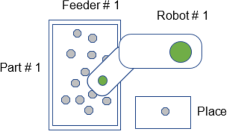
在本例中,检测并处理回调函数内潜在的错误状态,以免在Part Feeding进程循环内发生错误。在本例中使用PF_Vision回调函数获取图像,并将视觉结果加载至部件坐标队列中。机器人方面有较大的工具偏移。机器人会因情况而超出作业范围,因此可能无法将工具对准部件角度(通过视觉系统检测)。
如果未对错误进行处理,则会发生“坐标转换”错误。该样本代码用于在将坐标加载至部件坐标队列之前,确认是否处于机器人可拾取部件的角度。这是通过TargetOK语句来实现的。
样本代码
Main.prg
Function main
    If Motor = Off Then
        Motor On
    EndIf
    Power Low
    Jump Park
    PF_Start 1
Fend
PartFeeding.prg
Function PF_Robot(PartID As Integer) As Integer

    ' Tool 1 will be used to pick up the part
    Tool 1

    Do While PF_QueLen(PartID) > 0
        P0 = PF_QueGet(PartID)
        Jump P0
        On Gripper; Wait 0.2
        Jump Place
        Off Gripper; Wait 0.2
        PF_QueRemove PartID
        If PF_IsStopRequested(PartID) = True Then
            Exit Do
        EndIf
    Loop
    PF_Robot = PF_CALLBACK_SUCCESS

Fend

Function PF_Vision(PartID As Integer, ByRef numBack As Integer) As Integer
    Boolean found
    Integer i, numFront
    Real RB_X, RB_Y, RB_U, RB_Z

    ' Tool 1 will be used to pick up the part
    Tool 1

    ' Pick Z coordinate
    RB_Z = -132.0

    ' Initialize coordinates queue
    PF_QueRemove PartID, All
    PF_Backlight 1, On
    ' Detect the parts
    VRun UsrVisionSeq
    PF_Backlight 1, Off

    VGet UsrVisionSeq.Geom01.NumberFound, numFront 'Front Parts
    VGet UsrVisionSeq.Geom02.NumberFound, numBack 'Back Parts
    If numFront <> 0 Then
        For i = 1 To numFront
            VGet UsrVisionSeq.Geom01.RobotXYU(i), found, RB_X, RB_Y, RB_U
            If found Then
                If TargetOK(XY(RB_X, RB_Y, RB_Z, RB_U)) Then
                    PF_QueAdd PartID, XY(RB_X, RB_Y, RB_Z, RB_U)
                EndIf
            EndIf
         Next
    EndIf

    PF_Vision = PF_CALLBACK_SUCCESS

Fend
程序示例 6.2
示例类型:
回调函数内部处理时发生错误的处理
构成
- 机器人数量:1
- 送料器数量:1
- 送料器上的部件类型数量:1
- 配置位置数量:1
- 相机的方向:送料器#1上的固定向下相机
描述
在本例中使用PF_Vision回调函数获取图像,并将视觉结果加载至部件坐标队列中。在本例中,为了加载部件坐标队列,需要送料器上有最小数量的可拾取部件(本例为5个)。即使尝试3次也未加载部件坐标队列时,会显示向操作员询问是继续搜索部件还是停止的信息。
样本代码
Main.prg
Function main
    If Motor = Off Then
        Motor On
    EndIf
    Power Low
    Jump Park
    PF_Start 1
Fend
PartFeeding.prg
Function PF_Robot(PartID As Integer) As Integer

    ' Tool 1 will be used to pick up the part
    Tool 1

    Do While PF_QueLen(PartID) > 0
        P0 = PF_QueGet(PartID)
        Jump P0
        On Gripper; Wait 0.2
        Jump Place
        Off Gripper; Wait 0.2
        PF_QueRemove PartID
        If PF_IsStopRequested(PartID) = True Then
            Exit Do
        EndIf
    Loop
    PF_Robot = PF_CALLBACK_SUCCESS

Fend

Function PF_Vision(PartID As Integer, ByRef numBack As Integer) As Integer
    Boolean found
    Integer i, numFront
    Real RB_X, RB_Y, RB_U, RB_Z
    Integer RetryCount
    String msg$
    Integer mFlags, answer

    ' Pick Z coordinate
    RB_Z = -132.0

    ' Initialize coordinates queue
    PF_QueRemove PartID, All
    RetryCount = 0

    Do
        PF_Backlight 1, On
        ' Detect the parts
        VRun UsrVisionSeq
        PF_Backlight 1, Off

        VGet UsrVisionSeq.Geom01.NumberFound, numFront 'Front Parts
        VGet UsrVisionSeq.Geom02.NumberFound, numBack 'Back Parts
        If numFront >= 5 Then 'Min number of parts = 5 for this example
            For i = 1 To numFront
                VGet UsrVisionSeq.Geom01.RobotXYU(i), found, RB_X, RB_Y, RB_U
                If found Then
                    PF_QueAdd PartID, XY(RB_X, RB_Y, RB_Z, RB_U)
                EndIf
            Next
            Exit Do
        Else
            If RetryCount < 3 Then
                PF_Center 1, PF_CENTER_LONG_AXIS
                PF_Center 1, PF_CENTER_SHORT_AXIS
                PF_Flip 1, 500
                RetryCount = RetryCount + 1
             Else
                msg$ = PF_Name$(PartID) + CRLF + CRLF
                msg$ = msg$ + "Min Number of Parts Cannot be Loaded." + CRLF
                msg$ = msg$ + "Do you want to Continue trying?"
                mFlags = MB_YESNO + MB_ICONQUESTION
                MsgBox msg$, mFlags, "Minimum Number Parts", answer
                If answer = IDNO Then
                    PF_Stop(PartID)
                    Exit Do
                Else
                    RetryCount = 0
                EndIf
            EndIf
        EndIf
    Loop

    PF_Vision = PF_CALLBACK_SUCCESS

Fend
程序示例 6.3
示例类型:
PF_Status回调函数的状态错误的处理
构成
- 机器人数量:1
- 送料器数量:1
- 送料器上的部件类型数量:1
- 配置位置数量:1
- 相机的方向:送料器#1上的固定向下相机
描述
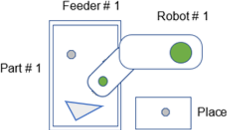
在本例中,托盘上的最后部件被检测为不良部件。托盘上安装有清除门选件且已启用。从托盘上排出检测到的“不良部件”,然后通过料斗供给新的部件,执行定芯与翻转运作。
样本代码
PartFeeding.prg
Function PF_Status(PartID As Integer, Status As Integer) As Integer

    Select Status

        ' Other Status Cases have been removed from this sample code for simplicity

        Case PF_STATUS_WRONGPART
            ' There may be a wrong part on the feeder platform.
            ' Purge Part 1 without vision feedback. Purge duration is default.
            ' The Purge Gate automatically opens and closes
            PF_Purge 1, PF_PURGETYPE_NOVISION
            ' Turn on the hopper for 3 sec
            PF_OutputOnOff 1, On, 1, 3000
            Wait 3.0
            PF_Center 1, PF_CENTER_LONG_AXIS
            PF_Center 1, PF_CENTER_SHORT_AXIS
            PF_Flip 1, 500

        ' Other Status Cases have been removed from this sample code for simplicity

     Send

    PF_Status = PF_CONTINUE
Fend
程序示例 6.4
示例类型:
PF_Status回调函数的用户错误的处理
构成
- 机器人数量:1
- 送料器数量:1
- 送料器上的部件类型数量:1
- 配置位置数量:1
- 相机的方向:送料器#1上的固定向下相机
描述
机器人配备带真空开关的真空杯型夹爪,以用于检测部件是否被适当拾取。真空传感器检测部件失败时,机器人会尝试再次拾取部件。如果失败3次,则生成用户错误 (8000)。
通过将PF_Robot的返回值设为用户错误编号,将用户错误发送至PF_Status回调函数。PF_Status回调函数用于显示操作员继续执行应用或结束应用的信息框。
样本代码
Main.prg
Function main
    If Motor = Off Then
        Motor On
    EndIf
    Power Low
    Jump Park
    PF_Start 1
Fend
PartFeeding.prg
Function PF_Robot(PartID As Integer) As Integer

    Integer PickRetryCount ' Pick Retry Count

    Do While PF_QueLen(PartID) > 0

        ' Get position of part to be picked
        P10 = PF_QueGet(PartID)

        PickRetryCount = 0
        Do
            Jump P10
            On Vacuum
            Wait Sw(VacOn), 0.5 ' 0.5 second timeout on
            Vacuum switch
            If TW = False Then ' Vacuum successful
                Exit Do ' Exit Do Loop and place the part
            EndIf
            Off Vacuum
            PickRetryCount = PickRetryCount + 1 ' Increment retry count
            If PickRetryCount = 3 Then
                ' Vacuum retries were not successful
                Jump Park
                PF_QueRemove PartID
                PF_Robot = 8000 ' Set the return value to user
                Error 8000
                ' PF_Status callback will be called with status value 8000
                 Exit Function
             EndIf
         Loop

        ' Part detected in vacuum gripper
        Jump Place
        Off Vacuum
        Wait 0.25

        ' Deque
        PF_QueRemove PartID

        'Check Cycle stop
        If PF_IsStopRequested(PartID) = True Then
            Exit Do
        EndIf

     Loop

    PF_Robot = PF_CALLBACK_SUCCESS

Fend

Function PF_Status(PartID As Integer, Status As Integer) As Integer
    String msg$
    Integer mFlags, answer

    Select Status
        ' Other Status Cases have been removed from this sample code for simplicity

        Case 8000 ' User Error 8000 occured.

            msg$ = PF_Name$(PartID) + CRLF + CRLF
            msg$ = msg$ + "Vacuum Pick error has occurred." + CRLF
            msg$ = msg$ + "Do you want to Continue?"
            mFlags = MB_YESNO + MB_ICONQUESTION
            MsgBox msg$, mFlags, "Vacuum Pick Error", answer
            If answer = IDNO Then
                PF_Status = PF_EXIT
            Else
                PF_Status = PF_CONTINUE
            EndIf

            Exit Function
    Send

Fend
程序示例 6.5
示例类型:
Part Feeding回调函数内的控制器错误的处理
构成
- 机器人数量:1
- 送料器数量:1
- 送料器上的部件类型数量:1
- 配置位置数量:1
- 相机的方向:送料器#1上的固定向下相机
描述
通常,发生控制器错误时,会通过Part Feeding进程自动将常数PF_STATUS_ERROR设为Status参数,并调用PF_Status回调函数。没有添加的用户代码时,会发生这种现象。PF_Status回调函数用于输出或显示错误编号与信息。如果PF_Status回调函数结束,Part Feeding进程则会结束。
但在本例中,需要处理PF_Robot回调函数内的特定控制器错误。
发生其他所有的控制器错时,在将PF_STATUS_ERROR被设为Status参数的状态下,调用PF_Status回调函数。
在这种情况下,为了防止损坏夹爪的电气配线与气压配管,需要避免U轴(SCARA型机器人)进行大于等于+/-360°的旋转动作。
通过Epson RC+的机器人管理器限制轴4的运作范围。如果限制轴4的运作范围,则可防止损坏电气配线与气压配管。送料器上的部件要对轴4进行超出其运作范围的旋转动作时,会发生错误4001“机械臂已达到运作范围的极限”。错误处理器从队列中删除部件,机器人也会重新开始拾取剩余的所有部件。
视觉系统重新获取相同被拒部件的图像,然后,选择所有的部件并在队列清空后执行PF_Flip,以防止再次添加到队列中。
样本代码
Main.prg
Function main
    If Motor = Off Then
        Motor On
    EndIf
    Power Low
    Jump Park
    PF_Start 1
Fend
PartFeeding.prg
Function PF_Robot(PartID As Integer) As Integer
    Integer errNum

    OnErr GoTo ehandle ' Error Handler

retry:
    Do While PF_QueLen(PartID) > 0

        ' Get position of part to be picked
        P10 = PF_QueGet(PartID)

        ' Error 4001 can occur if the part’s angle
        ' causes Joint 4 to rotate beyond its motion range
        Jump P10

        On Gripper
        Wait 0.25
        Jump Place
        Off Gripper
        Wait 0.25

        'Deque
        PF_QueRemove PartID

        'Check Cycle stop
        If PF_IsStopRequested(PartID) = True Then
            Exit Do
        EndIf

    Loop

    PF_Flip PartID

    PF_Robot = PF_CALLBACK_SUCCESS
    Exit Function

ehandle:

    errNum = Err
    If errNum = 4001 Then ' Example of Handled error
        Print "Error 4001: Arm reached the limit of motion range"
        PF_QueRemove PartID ' Remove the part from the queue
        EResume retry ' Continue picking the remaining parts in the queue
    Else
        ' Other unhandled errors
        ' PF_Status is called with the PF_STATUS_ERROR status parameter
        PF_Robot = PF_STATUS_ERROR
    EndIf
Fend

Function PF_Status(PartID As Integer, Status As Integer) As Integer

    Select Status

        ' Other Status Cases have been removed from this sample code for simplicity

        Case PF_STATUS_ERROR ' Error.
            msg$ = PF_Name$(PartID) + CRLF
            msg$ = msg$ + "Error!! (code: " + Str$(Err) + " ) " + ErrMsg$(Err)
            MsgBox msg$, MB_ICONSTOP

        ' Other Status Cases have been removed from this sample code for simplicity

     Send

    If Status = PF_STATUS_ERROR Then
        ' A controller error occurred. Terminate the Part Feeding Process.
        PF_Status = PF_EXIT
    Else
        ' Otherwise Continue running the Part Feeding Process.
        PF_Status = PF_CONTINUE
    EndIf

Fend