錯誤處理
程式範例 6.1
範例類型:
回呼函數內潛在錯誤狀態的處理
配置
- 機器人數量:1
- 送料器數量:1
- 送料器上的零件種類數:1
- 放置位置數量:1
- 攝影機的朝向:送料器#1上的朝下固定的攝影機
描述
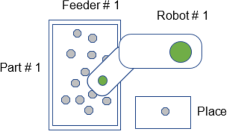
此範例展示如何檢測並處理回呼函數內的潛在錯誤狀態,以防止Part Feeding程序迴圈中發生錯誤。此範例使用PF_Vision回呼來取得影像並將視覺結果載入零件座標佇列。機器人有較大的工具偏移量。在某些情況下,機器人可能會超出工作範圍,因此無法使工具配合零件角度(由視覺檢測)。
若不進行錯誤處理,將導致「座標轉換」錯誤。此範例程式碼在將座標載入零件座標佇列前,會檢查機器人是否能以該角度拾取。這通過TargetOK陳述式實現。
範例程式碼
Main.prg
Function main
    If Motor = Off Then
        Motor On
    EndIf
    Power Low
    Jump Park
    PF_Start 1
Fend
PartFeeding.prg
Function PF_Robot(PartID As Integer) As Integer

    ' Tool 1 will be used to pick up the part
    Tool 1

    Do While PF_QueLen(PartID) > 0
        P0 = PF_QueGet(PartID)
        Jump P0
        On Gripper; Wait 0.2
        Jump Place
        Off Gripper; Wait 0.2
        PF_QueRemove PartID
        If PF_IsStopRequested(PartID) = True Then
            Exit Do
        EndIf
    Loop
    PF_Robot = PF_CALLBACK_SUCCESS

Fend

Function PF_Vision(PartID As Integer, ByRef numBack As Integer) As Integer
    Boolean found
    Integer i, numFront
    Real RB_X, RB_Y, RB_U, RB_Z

    ' Tool 1 will be used to pick up the part
    Tool 1

    ' Pick Z coordinate
    RB_Z = -132.0

    ' Initialize coordinates queue
    PF_QueRemove PartID, All
    PF_Backlight 1, On
    ' Detect the parts
    VRun UsrVisionSeq
    PF_Backlight 1, Off

    VGet UsrVisionSeq.Geom01.NumberFound, numFront 'Front Parts
    VGet UsrVisionSeq.Geom02.NumberFound, numBack 'Back Parts
    If numFront <> 0 Then
        For i = 1 To numFront
            VGet UsrVisionSeq.Geom01.RobotXYU(i), found, RB_X, RB_Y, RB_U
            If found Then
                If TargetOK(XY(RB_X, RB_Y, RB_Z, RB_U)) Then
                    PF_QueAdd PartID, XY(RB_X, RB_Y, RB_Z, RB_U)
                EndIf
            EndIf
         Next
    EndIf

    PF_Vision = PF_CALLBACK_SUCCESS

Fend
程式範例 6.2
範例類型:
回呼函數內處理發生錯誤的處理
配置
- 機器人數量:1
- 送料器數量:1
- 送料器上的零件種類數:1
- 放置位置數量:1
- 攝影機的朝向:送料器#1上的朝下固定的攝影機
描述
此範例使用PF_Vision回呼來取得影像並將視覺結果載入零件座標佇列。此範例中,需要在送料器上有最小數量的可拾取零件(此例中為5個)才能載入零件座標佇列。如果嘗試3次後仍未能載入零件座標佇列,會顯示訊息詢問操作員是否繼續搜尋零件或停止。
範例程式碼
Main.prg
Function main
    If Motor = Off Then
        Motor On
    EndIf
    Power Low
    Jump Park
    PF_Start 1
Fend
PartFeeding.prg
Function PF_Robot(PartID As Integer) As Integer

    ' Tool 1 will be used to pick up the part
    Tool 1

    Do While PF_QueLen(PartID) > 0
        P0 = PF_QueGet(PartID)
        Jump P0
        On Gripper; Wait 0.2
        Jump Place
        Off Gripper; Wait 0.2
        PF_QueRemove PartID
        If PF_IsStopRequested(PartID) = True Then
            Exit Do
        EndIf
    Loop
    PF_Robot = PF_CALLBACK_SUCCESS

Fend

Function PF_Vision(PartID As Integer, ByRef numBack As Integer) As Integer
    Boolean found
    Integer i, numFront
    Real RB_X, RB_Y, RB_U, RB_Z
    Integer RetryCount
    String msg$
    Integer mFlags, answer

    ' Pick Z coordinate
    RB_Z = -132.0

    ' Initialize coordinates queue
    PF_QueRemove PartID, All
    RetryCount = 0

    Do
        PF_Backlight 1, On
        ' Detect the parts
        VRun UsrVisionSeq
        PF_Backlight 1, Off

        VGet UsrVisionSeq.Geom01.NumberFound, numFront 'Front Parts
        VGet UsrVisionSeq.Geom02.NumberFound, numBack 'Back Parts
        If numFront >= 5 Then 'Min number of parts = 5 for this example
            For i = 1 To numFront
                VGet UsrVisionSeq.Geom01.RobotXYU(i), found, RB_X, RB_Y, RB_U
                If found Then
                    PF_QueAdd PartID, XY(RB_X, RB_Y, RB_Z, RB_U)
                EndIf
            Next
            Exit Do
        Else
            If RetryCount < 3 Then
                PF_Center 1, PF_CENTER_LONG_AXIS
                PF_Center 1, PF_CENTER_SHORT_AXIS
                PF_Flip 1, 500
                RetryCount = RetryCount + 1
             Else
                msg$ = PF_Name$(PartID) + CRLF + CRLF
                msg$ = msg$ + "Min Number of Parts Cannot be Loaded." + CRLF
                msg$ = msg$ + "Do you want to Continue trying?"
                mFlags = MB_YESNO + MB_ICONQUESTION
                MsgBox msg$, mFlags, "Minimum Number Parts", answer
                If answer = IDNO Then
                    PF_Stop(PartID)
                    Exit Do
                Else
                    RetryCount = 0
                EndIf
            EndIf
        EndIf
    Loop

    PF_Vision = PF_CALLBACK_SUCCESS

Fend
程式範例 6.3
範例類型:
PF_Status回呼中的狀態錯誤處理
配置
- 機器人數量:1
- 送料器數量:1
- 送料器上的零件種類數:1
- 放置位置數量:1
- 攝影機的朝向:送料器#1上的朝下固定的攝影機
描述
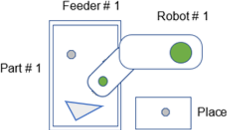
此範例中,檢測到托盤中的最後一個零件為不良零件。托盤安裝並啟用了清除閘門選項。檢測到的「不良零件」會從托盤排出,然後從料斗供應新零件,並執行集中和翻轉動作。
範例程式碼
PartFeeding.prg
Function PF_Status(PartID As Integer, Status As Integer) As Integer

    Select Status

        ' Other Status Cases have been removed from this sample code for simplicity

        Case PF_STATUS_WRONGPART
            ' There may be a wrong part on the feeder platform.
            ' Purge Part 1 without vision feedback. Purge duration is default.
            ' The Purge Gate automatically opens and closes
            PF_Purge 1, PF_PURGETYPE_NOVISION
            ' Turn on the hopper for 3 sec
            PF_OutputOnOff 1, On, 1, 3000
            Wait 3.0
            PF_Center 1, PF_CENTER_LONG_AXIS
            PF_Center 1, PF_CENTER_SHORT_AXIS
            PF_Flip 1, 500

        ' Other Status Cases have been removed from this sample code for simplicity

     Send

    PF_Status = PF_CONTINUE
Fend
程式範例 6.4
範例類型:
PF_Status回呼中的使用者錯誤處理
配置
- 機器人數量:1
- 送料器數量:1
- 送料器上的零件種類數:1
- 放置位置數量:1
- 攝影機的朝向:送料器#1上的朝下固定的攝影機
描述
機器人配備有帶真空開關的真空杯夾具,用於檢測零件是否正確取起。當真空感應器無法檢測到零件時,機器人會嘗試重新拾取。連續3次失敗後,會生成使用者錯誤(8000)。
使用者錯誤通過將PF_Robot的回傳值設為使用者錯誤編號,傳送到PF_Status回呼。PF_Status回呼會顯示一個訊息方塊,允許操作員選擇繼續或結束應用程式。
範例程式碼
Main.prg
Function main
    If Motor = Off Then
        Motor On
    EndIf
    Power Low
    Jump Park
    PF_Start 1
Fend
PartFeeding.prg
Function PF_Robot(PartID As Integer) As Integer

    Integer PickRetryCount ' Pick Retry Count

    Do While PF_QueLen(PartID) > 0

        ' Get position of part to be picked
        P10 = PF_QueGet(PartID)

        PickRetryCount = 0
        Do
            Jump P10
            On Vacuum
            Wait Sw(VacOn), 0.5 ' 0.5 second timeout on
            Vacuum switch
            If TW = False Then ' Vacuum successful
                Exit Do ' Exit Do Loop and place the part
            EndIf
            Off Vacuum
            PickRetryCount = PickRetryCount + 1 ' Increment retry count
            If PickRetryCount = 3 Then
                ' Vacuum retries were not successful
                Jump Park
                PF_QueRemove PartID
                PF_Robot = 8000 ' Set the return value to user
                Error 8000
                ' PF_Status callback will be called with status value 8000
                 Exit Function
             EndIf
         Loop

        ' Part detected in vacuum gripper
        Jump Place
        Off Vacuum
        Wait 0.25

        ' Deque
        PF_QueRemove PartID

        'Check Cycle stop
        If PF_IsStopRequested(PartID) = True Then
            Exit Do
        EndIf

     Loop

    PF_Robot = PF_CALLBACK_SUCCESS

Fend

Function PF_Status(PartID As Integer, Status As Integer) As Integer
    String msg$
    Integer mFlags, answer

    Select Status
        ' Other Status Cases have been removed from this sample code for simplicity

        Case 8000 ' User Error 8000 occured.

            msg$ = PF_Name$(PartID) + CRLF + CRLF
            msg$ = msg$ + "Vacuum Pick error has occurred." + CRLF
            msg$ = msg$ + "Do you want to Continue?"
            mFlags = MB_YESNO + MB_ICONQUESTION
            MsgBox msg$, mFlags, "Vacuum Pick Error", answer
            If answer = IDNO Then
                PF_Status = PF_EXIT
            Else
                PF_Status = PF_CONTINUE
            EndIf

            Exit Function
    Send

Fend
程式範例 6.5
範例類型:
Part Feeding回呼中的控制器錯誤的處理
配置
- 機器人數量:1
- 送料器數量:1
- 送料器上的零件種類數:1
- 放置位置數量:1
- 攝影機的朝向:送料器#1上的朝下固定的攝影機
描述
通常,當控制器錯誤發生時,Part Feeding程序會自動將常數PF_STATUS_ERROR設定到Status參數中,並呼叫PF_Status回呼函數。這無需追加使用者程式碼即可發生。PF_Status回呼函數會輸出或顯示錯誤編號和訊息。PF_Status回呼函數結束後,Part Feeding程序也會結束。
然而,此範例中需要在PF_Robot回呼函數內處理特定的控制器錯誤。
所有其他控制器錯誤會以Status參數設為PF_STATUS_ERROR的狀態呼叫PF_Status回呼函數。
在此情況下,為防止夾具的電氣佈線和氣壓管路損壞,必須確保U軸(SCARA機器人)不會旋轉超過+/-360°。
第4軸的動作範圍在Epson RC+的機器人管理器中受到限制。限制第4軸的動作範圍可防止電氣佈線和氣壓管路損壞。若送料器上的零件需要使第4軸旋轉超出其動作範圍,將發生錯誤4001「手臂已達到動作範圍的極限」。錯誤處理程序會從佇列中刪除該零件,機器人會繼續取起剩餘的所有零件。
為防止視覺系統重新拍攝同一被拒絕零件的影像並再次將其添加到佇列中,在所有零件被選取且佇列為空後,會執行PF_Flip。
範例程式碼
Main.prg
Function main
    If Motor = Off Then
        Motor On
    EndIf
    Power Low
    Jump Park
    PF_Start 1
Fend
PartFeeding.prg
Function PF_Robot(PartID As Integer) As Integer
    Integer errNum

    OnErr GoTo ehandle ' Error Handler

retry:
    Do While PF_QueLen(PartID) > 0

        ' Get position of part to be picked
        P10 = PF_QueGet(PartID)

        ' Error 4001 can occur if the part’s angle
        ' causes Joint 4 to rotate beyond its motion range
        Jump P10

        On Gripper
        Wait 0.25
        Jump Place
        Off Gripper
        Wait 0.25

        'Deque
        PF_QueRemove PartID

        'Check Cycle stop
        If PF_IsStopRequested(PartID) = True Then
            Exit Do
        EndIf

    Loop

    PF_Flip PartID

    PF_Robot = PF_CALLBACK_SUCCESS
    Exit Function

ehandle:

    errNum = Err
    If errNum = 4001 Then ' Example of Handled error
        Print "Error 4001: Arm reached the limit of motion range"
        PF_QueRemove PartID ' Remove the part from the queue
        EResume retry ' Continue picking the remaining parts in the queue
    Else
        ' Other unhandled errors
        ' PF_Status is called with the PF_STATUS_ERROR status parameter
        PF_Robot = PF_STATUS_ERROR
    EndIf
Fend

Function PF_Status(PartID As Integer, Status As Integer) As Integer

    Select Status

        ' Other Status Cases have been removed from this sample code for simplicity

        Case PF_STATUS_ERROR ' Error.
            msg$ = PF_Name$(PartID) + CRLF
            msg$ = msg$ + "Error!! (code: " + Str$(Err) + " ) " + ErrMsg$(Err)
            MsgBox msg$, MB_ICONSTOP

        ' Other Status Cases have been removed from this sample code for simplicity

     Send

    If Status = PF_STATUS_ERROR Then
        ' A controller error occurred. Terminate the Part Feeding Process.
        PF_Status = PF_EXIT
    Else
        ' Otherwise Continue running the Part Feeding Process.
        PF_Status = PF_CONTINUE
    EndIf

Fend