程式範例 5.1
範例類型:
平面平台 - 在PF_Feeder回呼函數中控制振動
配置
- 機器人數量:1
- 送料器數量:1
- 送料器上的零件種類數:1
- 放置位置數量:1
- 平台類型:平面
- 拾取區域:區域 B
- 攝影機的朝向:朝下固定的攝影機
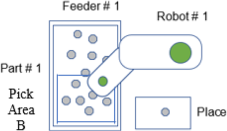
描述
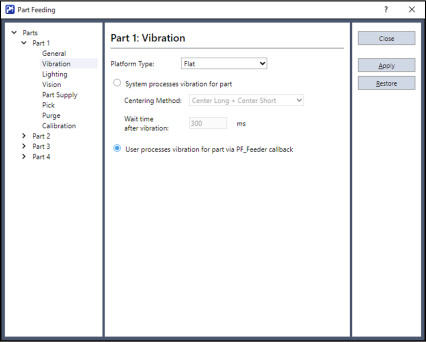
此範例使用標準的平面平台。使用平面平台時,通常選擇功能表 - [工具] - [料件送料] - [零件] - [振動]中的[系統控制振動]按鈕。
此範例介紹選擇[在PF_Feeder callback中控制振動],並自行描述振動處理的方法。使用者的振動處理在PF_Feeder回呼函數內執行。若需要與系統提供的振動處理不同的振動處理,請選擇[在PF_Feeder callback中控制振動]。使用自訂平台(孔洞、溝槽、凹槽等)時,需要通過PF_Feeder回呼函數自行處理振動。
如需詳細資訊,請參閱以下內容。
程式範例 5.2
選擇[在PF_Feeder callback中控制振動]時(適用於平面、防粘附、防滾動等各種標準平台),系統仍會判斷各種情況下零件的最適當處理方式。判斷結果通過引數「state」提供給PF_Feeder回呼函數。各種狀態的常數值在「PartFeeding.inc」檔案中定義。
例如,常數「PF_FEEDER_PICKOK」表示零件可以被機器人取放。另一個例子,當系統判斷翻轉零件是最佳處理方式時,常數「PF_FEEDER_FLIP」會傳遞給PF_Feeder回呼函數。如何處理引數「state」的值由使用者決定。
概念上,使用者可以使用PF_Feeder回呼函數的引數「state」和適當的送料器控制命令來重建系統處理。再次強調,對於平面平台,通常選擇[系統控制振動]。這表示此範例展示如何使用PF_Feeder回呼函數和送料器控制命令來模擬系統處理。
範例程式碼
Main.prg
Function main
    If Motor = Off Then
        Motor On
    EndIf
    Power Low
    Jump Park
    PF_Start 1
Fend
PartFeeding.prg
Function PF_Robot(PartID As Integer) As Integer
    Do While PF_QueLen(PartID) > 0
        P0 = PF_QueGet(PartID)
        Jump P0
        On Gripper; Wait 0.2
        Jump Place
        Off Gripper; Wait 0.2
        PF_QueRemove PartID
        If PF_IsStopRequested(PartID) = True Then
            Exit Do
        EndIf
    Loop
    PF_Robot = PF_CALLBACK_SUCCESS

Fend

Function PF_Feeder(PartID As Integer, NumFrontParts As Integer, NumBackParts As Integer, state As Integer) As Integer

    Select state

        ' OK to Pick
        Case PF_FEEDER_PICKOK
             ' Call PF_Robot because there are parts ready to pick
            PF_Feeder = PF_CALLBACK_SUCCESS

         ' Supply more parts
        Case PF_FEEDER_SUPPLY
            PFControlReturnVal = PF_Control(PartID, PF_CONTROL_SUPPLY_FIRST)
            PF_Feeder = PF_CALLBACK_RESTART ' Restart and re-acquire images

        ' Parts are spread out but need to be flipped
         Case PF_FEEDER_FLIP
            PF_Flip PartID
            ' Restart and re-acquire images
            PF_Feeder = PF_CALLBACK_RESTART

        ' Shift parts into pick region
        Case PF_FEEDER_SHIFT
            PF_Shift PartID, PF_SHIFT_FORWARD
            PF_Feeder = PF_CALLBACK_RESTART ' Restart and re-acquire images

        ' Center, Flip and Separate
        Case PF_FEEDER_CENTER_FLIP
            PF_Center PartID, PF_CENTER_LONG_AXIS
            PF_Center PartID, PF_CENTER_SHORT_AXIS
            PF_Flip PartID
            PF_Feeder = PF_CALLBACK_RESTART ' Restart and re-acquire images

        ' Hopper is empty
        Case PF_FEEDER_HOPPER_EMPTY
            PFStatusReturnVal = PF_Status(PartID, PF_STATUS_NOPART)
            PFControlReturnVal = PF_Control(PartID, PF_CONTROL_SUPPLY_FIRST)
            ' Center, Flip and Separate
            PF_Center PartID, PF_CENTER_LONG_AXIS
            PF_Center PartID, PF_CENTER_SHORT_AXIS
            PF_Flip PartID
            PF_Feeder = PF_CALLBACK_RESTART ' Restart and re-acquire images

        ' Parts have gathered against the platform wall
        Case PF_FEEDER_SHIFT_BACKWARDS
            PF_Shift PartID, PF_SHIFT_BACKWARD
            PF_Feeder = PF_CALLBACK_RESTART

        ' Hopper Supply, Center, Flip and Separate
        Case PF_FEEDER_SUPPLY_CENTER_FLIP
            PFControlReturnVal = PF_Control(PartID, PF_CONTROL_SUPPLY)
            PF_Center PartID, PF_CENTER_LONG_AXIS
            PF_Center PartID, PF_CENTER_SHORT_AXIS
            PF_Flip PartID
            PF_Feeder = PF_CALLBACK_RESTART ' Restart and re-acquire images

        ' Too many parts
        Case PF_FEEDER_TOO_MANY
            PFStatusReturnVal = PF_Status(PartID, PF_STATUS_TOOMANYPART)
            PF_Feeder = PF_CALLBACK_RESTART ' Restart and re-acquire images

        ' Wrong part
        Case PF_FEEDER_WRONGPART
            PFStatusReturnVal = PF_Status(PartID, PF_STATUS_WRONGPART)
            PF_Feeder = PF_CALLBACK_RESTART ' Restart and re-acquire images

    Send

Fend