程序示例 5.1
示例类型:
平面平台 - 通过PF_Feeder回调函数控制振动
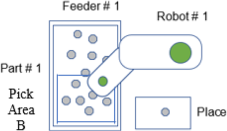
构成
- 机器人数量:1
- 送料器数量:1
- 送料器上的部件类型数量:1
- 配置位置数量:1
- 平台类型:平面
- 拾取区域:区域B
- 相机的方向:固定向下相机
描述
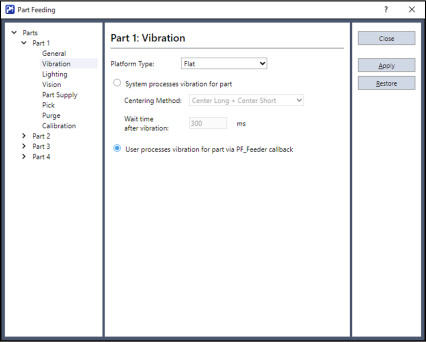
在本例中使用标准的平面平台。使用平面平台时,通常选择菜单 - [工具] - [上料] - [部件] - [振动]中的[由系统控制振动]按钮。
本例介绍选择[通过PF_Feeder callback控制振动]并独自记述振动处理的方法。在PF_Feeder回调函数内执行用户的振动处理。需要与系统提供的振动处理不同的振动处理时,选择[通过PF_Feeder callback控制振动]。使用自定义平台(孔、长槽、定位槽等)时,需要通过PF_Feeder回调函数自行处理振动。
有关详细信息,请参阅以下内容。
程序示例 5.2
即使选择[通过PF_Feeder callback控制振动](平面、防粘贴、防滚动的各标准平台),系统也会判断是否对处于各种状况的部件进行了最佳处理。通过自变量“state”将判断结果提供给PF_Feeder回调函数。由“PartFeeding.inc”文件定义各种状态的常数值。
比如,常数“PF_FEEDER_PICKOK”表示机器人可拾取部件。作为其他示例,系统判断翻转部件为最佳处理时,会将常数“PF_FEEDER_FLIP”交接给PF_Feeder回调函数。具体如何处理自变量“state”的值,则委托给用户。
从概念上来讲,用户可使用PF_Feeder回调函数的自变量“state”与适当的送料器控制命令,重新创建系统处理。虽然会重复进行,但平面平台时,通常会选择[由系统控制振动]。也就是说,本例所述为使用PF_Feeder回调函数与送料器控制命令模拟系统处理的方法。
样本代码
Main.prg
Function main
    If Motor = Off Then
        Motor On
    EndIf
    Power Low
    Jump Park
    PF_Start 1
Fend
PartFeeding.prg
Function PF_Robot(PartID As Integer) As Integer
    Do While PF_QueLen(PartID) > 0
        P0 = PF_QueGet(PartID)
        Jump P0
        On Gripper; Wait 0.2
        Jump Place
        Off Gripper; Wait 0.2
        PF_QueRemove PartID
        If PF_IsStopRequested(PartID) = True Then
            Exit Do
        EndIf
    Loop
    PF_Robot = PF_CALLBACK_SUCCESS

Fend

Function PF_Feeder(PartID As Integer, NumFrontParts As Integer, NumBackParts As Integer, state As Integer) As Integer

    Select state

        ' OK to Pick
        Case PF_FEEDER_PICKOK
             ' Call PF_Robot because there are parts ready to pick
            PF_Feeder = PF_CALLBACK_SUCCESS

         ' Supply more parts
        Case PF_FEEDER_SUPPLY
            PFControlReturnVal = PF_Control(PartID, PF_CONTROL_SUPPLY_FIRST)
            PF_Feeder = PF_CALLBACK_RESTART ' Restart and re-acquire images

        ' Parts are spread out but need to be flipped
         Case PF_FEEDER_FLIP
            PF_Flip PartID
            ' Restart and re-acquire images
            PF_Feeder = PF_CALLBACK_RESTART

        ' Shift parts into pick region
        Case PF_FEEDER_SHIFT
            PF_Shift PartID, PF_SHIFT_FORWARD
            PF_Feeder = PF_CALLBACK_RESTART ' Restart and re-acquire images

        ' Center, Flip and Separate
        Case PF_FEEDER_CENTER_FLIP
            PF_Center PartID, PF_CENTER_LONG_AXIS
            PF_Center PartID, PF_CENTER_SHORT_AXIS
            PF_Flip PartID
            PF_Feeder = PF_CALLBACK_RESTART ' Restart and re-acquire images

        ' Hopper is empty
        Case PF_FEEDER_HOPPER_EMPTY
            PFStatusReturnVal = PF_Status(PartID, PF_STATUS_NOPART)
            PFControlReturnVal = PF_Control(PartID, PF_CONTROL_SUPPLY_FIRST)
            ' Center, Flip and Separate
            PF_Center PartID, PF_CENTER_LONG_AXIS
            PF_Center PartID, PF_CENTER_SHORT_AXIS
            PF_Flip PartID
            PF_Feeder = PF_CALLBACK_RESTART ' Restart and re-acquire images

        ' Parts have gathered against the platform wall
        Case PF_FEEDER_SHIFT_BACKWARDS
            PF_Shift PartID, PF_SHIFT_BACKWARD
            PF_Feeder = PF_CALLBACK_RESTART

        ' Hopper Supply, Center, Flip and Separate
        Case PF_FEEDER_SUPPLY_CENTER_FLIP
            PFControlReturnVal = PF_Control(PartID, PF_CONTROL_SUPPLY)
            PF_Center PartID, PF_CENTER_LONG_AXIS
            PF_Center PartID, PF_CENTER_SHORT_AXIS
            PF_Flip PartID
            PF_Feeder = PF_CALLBACK_RESTART ' Restart and re-acquire images

        ' Too many parts
        Case PF_FEEDER_TOO_MANY
            PFStatusReturnVal = PF_Status(PartID, PF_STATUS_TOOMANYPART)
            PF_Feeder = PF_CALLBACK_RESTART ' Restart and re-acquire images

        ' Wrong part
        Case PF_FEEDER_WRONGPART
            PFStatusReturnVal = PF_Status(PartID, PF_STATUS_WRONGPART)
            PF_Feeder = PF_CALLBACK_RESTART ' Restart and re-acquire images

    Send

Fend