[Tools]-[Robot Manager]-[Points] Page
You can input/delete the point data.
When a point file is selected, the robot controller loads the file into memory.
As points are taught on the [Robot Manager]-[Jog & Teach] page, the spreadsheet on the Points page is updated.
For details on how to save points, refer to Saving your work.
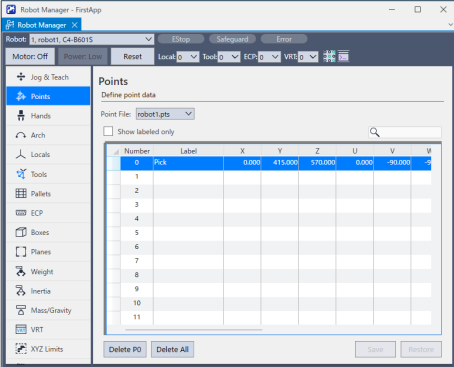
Navigating the grid
Press the [Tab] key to move to the next cell. Press the [Shift] + [Tab] key to move to the previous cell. Press the arrow [↑] or [↓] key to move to the cell above or below.
| Item | Description |
|---|---|
| Point File | Select a point file. |
| Show only registered | Only shows registered point data. |
 | Find label. |
| Delete Pxxx | Deletes the selected point. You will be prompted to confirm the operation. |
| Delete All | Deletes all points in the file. You will be prompted to confirm the operation. |
| Save | Saves the current values. |
| Restore | Reverts to the previous values. You will be prompted to confirm the operation. |