[Setup]-[System Configuration]-[Controller]-[Configuration] Page
This page allows the user to view and change the controller configuration settings.
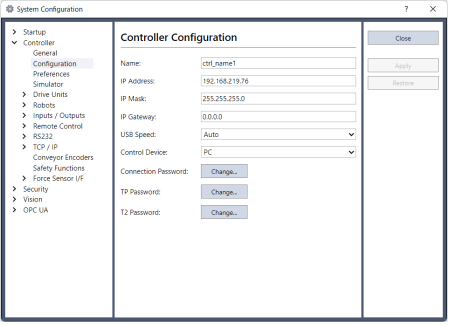
| Item | Description |
|---|---|
| Name | Use this text box to change the controller name. You may use any name up to 16 characters long using alphanumeric characters and underscore. |
| IP Address | Use this text box to set current IP address of the LAN-1 port. The IP Address must be on the same subnet as the PC. (Default IP address is 192.168.0.1.) |
| IP Mask | Use this text box to set the IP mask of the LAN-1 port. Note that the IP Mask must match the IP mask used for your network. |
| IP Gateway | Use this text box to set the IP gateway of the LAN-1 port. This is only required if you will be accessing the controller from outside of the local network. |
| Control Device | Allows you to select the Control Device. |
| Connection Password | Allows you to change authentication passwords for the Ethernet connecting Controller and PC connection destination. |
| TP Password | Allows you to change the TP password. |
| T2 Password | Allows you to change the TP2 password. |