VCalPoints Method
Description
This command enables you to teach vision calibration points.
Syntax
Sub VCalPoints (CalibName As String)
Sub VCalPoints (CalibName As String, ByRef Status As Integer)
Sub VCalPoints (CalibName As String, Parent As Form)
Sub VCalPoints (CalibName As String, Parent As Form, ByRef Status As Integer)
Parameters
- CalibName
A string expression indicating the calibration scheme name for the current project. - Status
Optional. An integer variable that receives the status of the point teaching. 0: Unsuccessful, 1: Successful - Parent
Optional. A .NET form that is the parent of the window.
Remarks
When you execute the VCalPoints command, the Teach Calibration Points dialog is opened. When the [Finish] button is clicked, the calibration data is automatically saved.
You must have already created the calibration scheme from Epson RC+ 8.0.
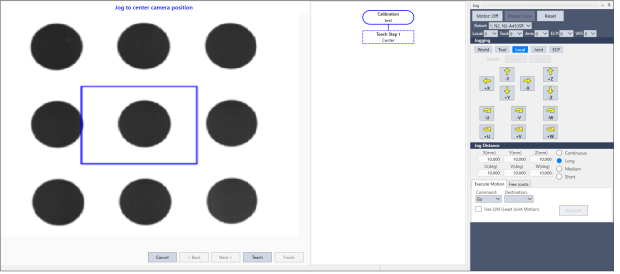
Use the Status parameter to check if the point teaching was successful. When all points are taught and the [Finish] button is clicked, Status returns 1: Successful.
See Also
VCal Method
VCalPoints Example
VB Example:
Dim status As Integer
m_spel.VCalPoints("CAMCAL1", status)
C# Example:
int status;
m_spel.VCalPoints("CAMCAL1", out status);