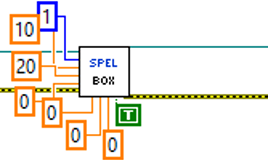
Box VI
Tool Palette
Epson Robots 8.0 | Robot Settings
Description
Specifies an approach check area defined within a box.
Inputs
| Spel Ref In | Spel reference from a previous Spel Ref Out. |
| Error In | Error condition from a previous Spel node. |
| AreaNumber | Integer number from 1-15 representing which of the 15 boxes to define. |
| Min X | The minimum X coordinate position of the approach check area. |
| Max X | The maximum X coordinate position of the approach check area. |
| Min Y | The minimum Y coordinate position of the approach check area. |
| Max Y | The maximum Y coordinate position of the approach check area. |
| Min Z | The minimum Z coordinate position of the approach check area. |
| Max Z | The maximum Z coordinate position of the approach check area. |
| Polarity On | Set the remote output logic when the corresponding remote output is used. To set I/O output to On when the end effector is in the box area, use True. To set I/O output to Off when the end effector is in the box area, use False. |
Outputs
| Spel Ref Out | Spel reference output for next VI to use. |
| Error Out | Error condition output for subsequent Spel nodes. |
Remarks
If an error occurs and the ErrorNumber property of the SpelException is 3101, see the comments in the SetPoint VI.
See Also
XYLim VI, SetPoint VI
Box Example