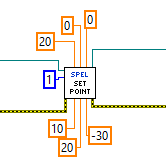
SetPoint VI
Tool Palette
Epson Robots 8.0 | Points
Description
Sets the coordinate data for a point for the current robot.
Inputs
| Spel Ref In | Spel reference from a previous Spel Ref Out. |
| Error In | Error condition from a previous Spel node. |
| Point Number | Optional. Specifies the target end point by using the point number for a previously taught point in the Controller's point memory for the current robot. If Point Name is specified, then Point Number is ignored. |
| Point Name | Optional. Specifies the point by using a string expression for the point name. If Point Name is not specified, then the Point Number input will be used. |
| X - W | X, Y, Z, U, V, W coordinates of the specified point. |
Outputs
| Spel Ref Out | Spel reference output for next VI to use. |
| Error Out | Error condition output for subsequent Spel nodes. |
Remarks
If an error occurs and the ErrorNumber property of the SpelException is 3101, refer to the comments of the SetPoint method in RCAPINet Reference - Spel Class Methods.
The CurrentCulture property settings can be changed using the LabVIEW Property Node ( .NET) and Invoke Node ( .NET). Below is an example of how to set the CurrentCulture in C# in the SetPoint method comments in LabVIEW.

See Also
GetPoint VI, LoadPoints VI, Robot VI, SavePoints VI
SetPoint Example